Harness Engineering Best Practices for Claude Code / Codex Users, Explained Plainly
by 逆瀬川ちゃん
44 min read
Hi there! This is Sakasegawa-chan (@gyakuse)!
Today I want to do a deep dive into harness engineering and summarize best practices as of March 2026.
What is Harness Engineering?
Tracing the definition
If we trace the original definition by Mitchell Hashimoto, harness engineering referred to the continuous improvement of AGENTS.md by humans, plus the toolchain that lets an agent self-verify the correctness of its own work.
Today the term is used more broadly. In one sentence, harness engineering is what you do to keep a Coding Agent running autonomously with as little human intervention as possible and to stabilize its output. More simply, it's the training wheels for a Coding Agent. The system, not the model, is what matters. The same model produces dramatically different results depending on the harness around it.
The engineer's job is shifting from "produce correct code" to "design environments where agents reliably produce correct code."
About the shelf life of this field
If we imagine an ideal Coding Agent, we can picture a future where most of the harness becomes unnecessary. Keep in mind that the need for a harness comes from the current limitations of LLMs and the incompleteness of Coding Agents.
Harness engineering may not be an especially important field a few months from now. Maybe it gets absorbed into the Coding Agent itself, so individual developers or organizations don't have to think about it. Maybe the LLMs improve enough that parts of (or the whole) harness stack stop being needed.
It could be a set of problems that just goes away if we sleep for a few months, or at most a year. But for those of us living in March 2026, it's undeniably an important field.
Investing in a harness compounds
Investing in a harness compounds. Add one linter rule and every session from here on out avoids that mistake. Add one test and every future session catches that regression.
This article walks through seven topics, anti-patterns, and the minimum viable harness (MVH) you can start tomorrow.
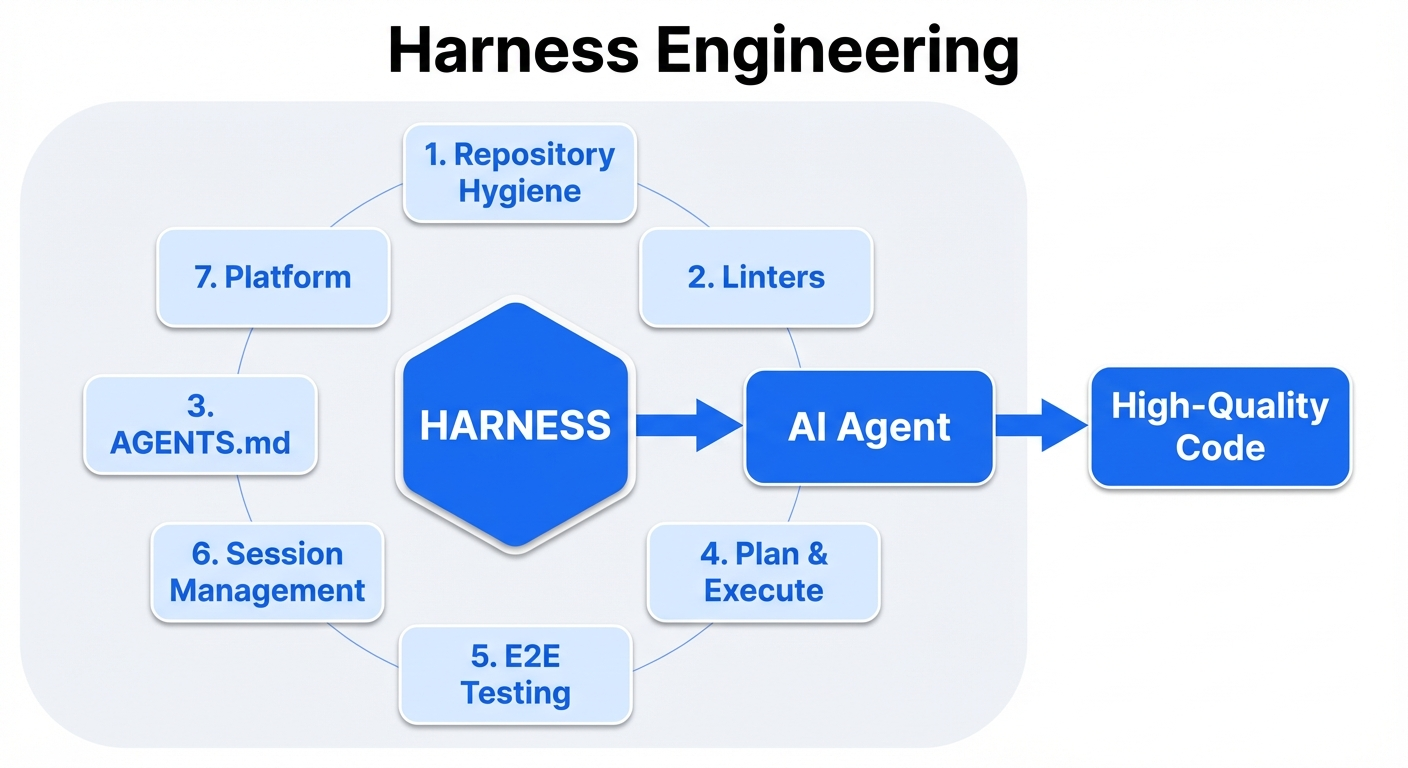
1: Repository hygiene: design for rot
Agents (Claude Code, Codex, etc.) are free to walk through the repository with grep / find / cat, and they treat any text they find as an equally authoritative source. Agents don't have the intuition that "this was a note from three months ago that's out of date now." So the freshness of every piece of text in the repo matters.
What belongs in the repo
What belongs in the repo are executable artifacts: code, tests, linter configs, type definitions, schema definitions, CI configs. These are mechanically decidable as right or wrong, and if they rot they break at runtime and get caught.
The other thing that belongs in the repo is Architecture Decision Records (ADRs). ADRs record "at this point in time we decided this, for these reasons." You don't edit them, you supersede them. Because they have timestamps and a status (Accepted / Superseded / Deprecated), an agent can structurally judge whether they're still valid.
What doesn't belong in the repo
Conversely, prose explaining "how the system currently works," design overviews, hand-written API descriptions, or textual explanations of architecture diagrams don't belong in the repo. These inevitably fall behind the code's evolution, rot, and then agents can adopt the rotten information as truth.
OpenAI's lesson "anything an agent can't access in its context doesn't exist" has an inverted form: "stale information the agent can find in the repo is indistinguishable from the latest truth." Chroma's research confirms that all 18 frontier models degrade as context length grows, which means leaving irrelevant or stale information in the repo is itself a cause of performance degradation.
Repo hygiene
The OpenAI team found that agents reproduce existing patterns in the repository (including inconsistent or sub-optimal ones). Initially they spent every Friday (20% of the week) on AI-slop cleanup, but that didn't scale.
The solution is to encode "golden principles" into the repo and enforce them as opinionated mechanical rules. Run garbage-collection agents (Codex tasks that detect drift in the background and open refactor PRs) on a schedule.
A caveat: garbage-collection agents themselves are recursively susceptible to context rot. Base their inspection criteria on deterministic rules (linters, type checkers, structural tests) rather than relying on agent "judgement."
Tests resist rot better than documentation
Tests can't lie when you run them. Descriptive documentation saying "this feature works like this" rots; a test that verifies "this feature works like this" turns red when it breaks. As much as possible, express specifications, expected behavior, and constraints as tests.
Drawing on Mitchell Hashimoto's observations, agents are "goal-oriented": they'll break things outside the current task scope to meet their immediate objective. The test coverage that was enough for human-only development is not enough for agent-assisted development. Whenever an agent makes a mistake, add a test to prevent it. One added test applies to every future agent session.
Preserve decision history with ADRs
Because of the immutability principle of ADRs, it's safe if an agent finds one via grep. When a past decision is superseded, the status makes it explicit, so an agent can structurally tell which decision is currently in effect.
Pursue pragmatic answers
That said, we do want a README.md. It's nice to have docs in a docs/ folder. For agents, tests and ADRs cover almost everything, so maybe documentation should live outside the grep / find / cat scope (in another repo or another system).
So, we understand why keeping the repository clean matters. But concretely, how do you mechanically enforce agent output quality? That's up next.
2: Enforce quality with deterministic tools and architectural guardrails
Don't make the LLM do the linter's job
HumanLayer's principle gets right to the point: "LLMs are expensive and slow compared to traditional linters and formatters. Whenever a deterministic tool can do the job, use it."
Linters, formatters, type checkers, and structural tests don't rot. If config changes, CI breaks and you find out immediately. Offloading quality enforcement from prompt instructions to mechanical enforcement makes reliability compound.
There's a gap between writing "run the linter" in CLAUDE.md and running the linter in a Hook: "almost every time" vs. "every time without exception." In production systems this gap is fatal. After 47 sessions and a long debug chain that ate most of the context window, the agent writes a file and moves on. The linter is forgotten.
Designing feedback loops: Hooks
Claude Code Hooks are shell commands, prompts, or subagents that run automatically at specific points in an agent's lifecycle. Just as Git hooks run before/after Git operations, Claude Code Hooks run before/after any Claude Code action (file writes, bash execution, agent decisions).
The implementation examples below all assume settings-based hooks defined in .claude/settings.json or .claude/settings.local.json. Agent / skill frontmatter hooks have different behavior, so I won't focus on them here.
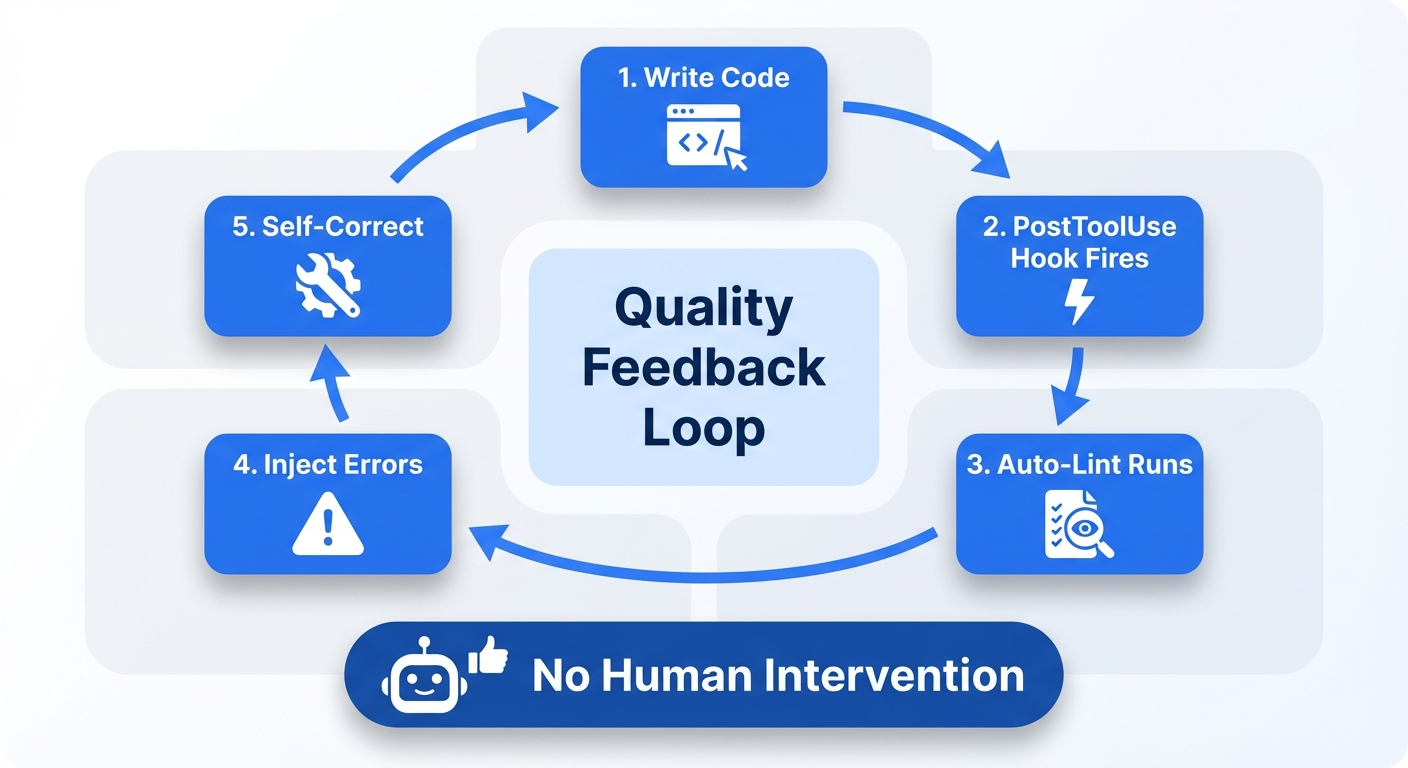
The most powerful pattern is the quality feedback loop.
- Agent writes code (PostToolUse event fires)
- Hook automatically runs linter / type checker / test suite
- If errors are found, return a docs-compliant JSON on stdout, whose
hookSpecificOutput.additionalContextis injected into the agent's context - Agent self-corrects errors in its next action
- The loop repeats on every file write, without human intervention
The key thing is that a PostToolUse Hook just printing to stdout is not treated as additionalContext. To inject feedback, the Hook must return JSON containing hookSpecificOutput.additionalContext.
A Hook that injects JSON like "handler.ts line 42, line 78, line 103, 3 TypeScript errors" is dramatically more useful than a Hook that just blocks the action. Blocking stops the process; feedback injection drives the fix forward.
Four Hook patterns
- Safety Gates (PreToolUse): block destructive commands (
rm -rf,drop table), prevent editing sensitive files (.env). Block with exit 2 and the reason on stderr is fed back to the agent - Quality Loops (PostToolUse): auto-run linter / formatter / tests after file edits. Inject results as
hookSpecificOutput.additionalContextto drive agent self-correction - Completion Gates (Stop): verify with tests when the agent declares completion. Don't let the agent stop until tests pass. Check the
stop_hook_activeflag to avoid infinite loops - Observability (all events): stream agent intent at PreToolUse, results at PostToolUse, and context lost at PreCompact into your observability pipeline
Example: PostToolUse auto-lint (TypeScript/JavaScript)
{
"hooks": {
"PostToolUse": [
{
"matcher": "Write|Edit|MultiEdit",
"hooks": [
{
"type": "command",
"command": "bash .claude/hooks/post-ts-lint.sh"
}
]
}
]
}
}
#!/usr/bin/env bash
set -euo pipefail
input="$(cat)"
file="$(jq -r '.tool_input.file_path // .tool_input.path // empty' <<< "$input")"
case "$file" in
*.ts|*.tsx|*.js|*.jsx) ;;
*) exit 0 ;;
esac
npx biome format --write "$file" >/dev/null 2>&1 || true
npx oxlint --fix "$file" >/dev/null 2>&1 || true
diag="$(npx oxlint "$file" 2>&1 | head -20)"
if [ -n "$diag" ]; then
jq -Rn --arg msg "$diag" '{
hookSpecificOutput: {
hookEventName: "PostToolUse",
additionalContext: $msg
}
}'
fi
Two key points in this example. First, run auto-fixes (biome format, oxlint --fix) up front and only return the remaining violations to Claude. Second, return feedback as docs-compliant JSON with hookSpecificOutput.additionalContext instead of ordinary stdout.
Python, Go, and Rust work the same way: run fast auto-fixes first, then return the remaining violations as additionalContext.
As of March 2026, Oxlint + Biome (TypeScript), Ruff (Python), and gofumpt + golangci-lint (Go) fit PostToolUse Hooks better than ESLint + Prettier. Why? Speed. PostToolUse Hooks need to finish in milliseconds to seconds, and Rust-based tools are 50–100x faster than Node.js-based tools.
The Plankton pattern (advanced)
The Plankton pattern runs formatters plus more than 20 linters in a PostToolUse Hook and collects remaining violations as structured JSON. Subprocesses routed to Haiku / Sonnet / Opus based on violation complexity perform the fixes.
It works in three phases: (1) silent auto-formatting (resolves 40–50% of issues) → (2) remaining violations turned into structured JSON → (3) fixes delegated to subprocesses. As a crucial defense, it also includes a config-protection hook that prevents the agent from silencing tests by changing linter configs.
Per-language linter selection guide (March 2026)
Focusing on use in PostToolUse Hooks, these are selected on three axes: speed, auto-fix capability, and custom-rule support.
TypeScript/JavaScript: Oxlint (lint) + Biome (format)
Oxlint is a Rust linter developed by VoidZero (the Vite team). v1.0 stable landed in June 2025. It's 50–100x faster than ESLint; Shopify's lint went from 75 minutes to 10 seconds. It ships more than 520 ESLint-compatible rules, and via a JavaScript plugin system existing ESLint plugins work with minimal changes. Shopify, Airbnb, Mercedes-Benz, Linear, and Framer use it in production.
Biome is a Rust-based integrated linter + formatter. 10–25x faster than ESLint + Prettier. v2.0 (June 2025) added custom rules via GritQL plugins, and v2.1+ adds domain-specific configurations (React, Next.js, tests).
Use them together: in a PostToolUse Hook, Oxlint for linting then Biome for formatting. ESLint is too slow for PostToolUse, but it's worth keeping in pre-commit hooks / CI for custom architectural rules.
Python: Ruff (the only choice)
Ruff is Rust-based. It combines all the features of Flake8, isort, pyupgrade, pydocstyle, and Black into a single binary. Over 900 rules. Even on large codebases, PostToolUse Hook runs finish in under a second.
Limitation: you can't add custom rules. For enforcing architecture boundaries, pair it with ast-grep or pylint custom checkers.
Go: golangci-lint
golangci-lint is a meta-linter that runs 50+ linters in parallel. Caching keeps it in the seconds even on large codebases. The --fix flag supports auto-fix for 35 linters. Adopted by Kubernetes, Prometheus, and Terraform.
Recommended linters to enable: staticcheck, gosec, errcheck, revive, govet, gofumpt, gci, modernize.
Rust: Clippy (pedantic + forbid allow_attributes)
In the rust-magic-linter pattern, you enable pedantic clippy in Cargo.toml and structurally make it impossible for the agent to silence lints via #[allow(clippy::...)] by setting allow_attributes = "deny".
[lints.clippy]
pedantic = { level = "warn", priority = -1 }
unwrap_used = "deny"
expect_used = "deny"
allow_attributes = "deny"
dbg_macro = "deny"
Swift / Kotlin
SwiftLint has 200+ rules, regex/AST-based custom rules, and --autocorrect support. detekt is a static analyzer for Kotlin. ktfmt is a formatter 40% faster than ktlint.
Linter comparison table
| Tool | Languages | Speed vs ESLint | Custom rules | Auto-fix | PostToolUse fit |
|---|---|---|---|---|---|
| Oxlint | JS/TS | 50–100x | JS plugins (ESLint-compatible) | Yes | Best |
| Biome | JS/TS/JSON/CSS | 10–25x | GritQL plugins | Yes (lint+format) | Good |
| Ruff | Python | 10–100x vs Flake8 | None | Yes | Best |
| golangci-lint | Go | - | Via sub-linters | 35 linters | Good |
| Clippy | Rust | - | None | Partial | Good |
| ast-grep | Multi-lang | - | YAML + JS patterns | Yes (rewrite) | For custom rules |
Custom linter strategy: designing rules for agents
Factory.ai's four categories
The open-source eslint-plugin from Factory.ai classifies agent-facing lint rules into four categories.
- Grep-ability: prefer named exports over default exports. Consistent error types and explicit DTOs. Increases the hit rate when agents walk the codebase with grep
- Glob-ability: keep file structure predictable. Lets agents reliably place, find, and refactor files
- Architecture boundaries: block cross-layer imports. Enforce dependency direction with domain-specific allowlists/denylists
- Security / privacy: block plain-text secrets, mandate input schema validation, forbid
eval/new Function
Tooling choices for custom rules
For TypeScript/JavaScript, eslint-plugin-local-rules lets you colocate project-specific rules in the repo (no npm publish needed). Walk the AST with ESLint's visitor pattern and put agent-facing fix instructions in meta.messages.
For multi-language coverage, ast-grep is the best pick. You define rules with code-shaped patterns (syntax patterns that look like code rather than regex). It supports both YAML definitions and a JavaScript API, covering Python, Go, Rust, TypeScript, and other major languages.
AST-based rules are dramatically more reliable than regex-based rules. Regex produces false positives when matching inside comments or string literals. Use AST-based rules for anything beyond simple filename / import-path checks.
Make error messages into fix instructions
OpenAI's smartest trick is this one. Custom linter error messages don't just point out violations; they also tell the agent how to fix them. The tool "educates" the agent as it runs. That way a human doesn't have to step in every time a rule is violated.
All custom linter error messages should follow this structure.
ERROR: [what is wrong]
[file:line]
WHY: [why this rule exists, link to ADR]
FIX: [concrete fix steps, include a code example if possible]
EXAMPLE:
// Bad:
import { db } from '../infra/database';
// Good:
import { DatabaseProvider } from '../domain/providers';
A few concrete examples.
- Dependency direction violation (OpenAI pattern): "ServiceA cannot directly depend on the Infrastructure layer. Define a Provider interface in the Domain layer (src/domain/providers/) and implement it in the Infrastructure layer (src/infra/providers/). See ADR-007."
- DTO colocation violation: "Inline Zod schemas are not allowed. Place DTOs at src/dtos/[domain]/[action].dto.ts."
- TypeScript any usage: "Using
anyis forbidden. If the correct type is unknown, useunknownand narrow with type guards. AI agents tend to fall back toanywhen type inference fails."
The core insight: agents can't ignore linter error messages (CI won't pass) but they can ignore documentation. So write the rule's documentation inside the error message.
Provide instant feedback with pre-commit hooks
Run linters / formatters / type checks not just in CI (remote) but also in pre-commit hooks (local, immediate). For an agent, "instant feedback" plays the same role as a compile error does for a human.
Lefthook is Go-based and fast. Personal settings can live in lefthook-local.yml, and humans can skip with git commit --no-verify. For agents, ban git commit --no-verify in your Claude Code config to make hook bypass structurally impossible. Flexible for humans, strict for agents: a deliberate dual standard.
One caveat: Claude Code Action (committing via the GitHub API) bypasses local Git hooks. Counter this by injecting a lint process in a PreToolUse hook before MCP operations.
Couple ADRs with executable rules
The archgate approach pairs each ADR with a companion .rules.ts file, encoding the architecture decision as an executable check. Coupling ADRs (immutable "why") with linter rules (executable "what") satisfies both rot-resistance conditions at once.
Linter config protection: stop agents from "rule tampering"
When an agent hits a linter error, a very common behavior is to change the linter config to make the error go away instead of fixing the code. The PreToolUse hook below prevents this.
{
"hooks": {
"PreToolUse": [
{
"matcher": "Write|Edit|MultiEdit",
"hooks": [
{
"type": "command",
"command": "bash -c 'FILE=$(jq -r \".tool_input.file_path // .tool_input.path\" <<< \"$(cat)\"); PROTECTED=\".eslintrc eslint.config biome.json pyproject.toml .prettierrc tsconfig.json lefthook.yml .golangci.yml Cargo.toml .swiftlint.yml .pre-commit-config.yaml\"; for p in $PROTECTED; do case \"$FILE\" in *$p*) echo \"BLOCKED: $FILE is a protected config file. Fix the code, not the linter config.\" >&2; exit 2;; esac; done'"
}
]
}
]
}
}
Also ban git commit --no-verify in your Claude Code config so the agent structurally cannot bypass Git hooks.
Lint anti-patterns specific to AI-generated code
According to OX Security and Snyk's research, AI-generated code has anti-patterns that don't show up in human-written code.
- TypeScript
anyabuse: agents fall back toanywhen type inference fails. Enforce@typescript-eslint/no-explicit-anyat the error level - Code duplication: agents generate new code without searching the codebase. Detect with jscpd or Plankton's duplicate detection
- Ghost files: instead of editing an existing file, agents create new files with similar names. Enforce filename conventions and directory structure with a linter
- Comment floods: OX Security's research observed the "Comments Everywhere" pattern in 90–100% of AI-generated repositories. Consider checking comment ratio
- Security vulnerabilities: per Snyk, 36–40% of AI-generated code contains security vulnerabilities. Make gosec (Go), Ruff's S rules (Python), and eslint-plugin-security (JS/TS) mandatory
Recommended linter stacks by language
TypeScript / Node.js project
| Layer | Tool | Purpose |
|---|---|---|
| PostToolUse (ms) | Biome format → Oxlint | Auto-format, fast lint |
| Pre-commit (s) | Lefthook → Oxlint + tsc --noEmit | Full-file lint + type check |
| CI (min) | ESLint (custom architectural rules) + test suite | Deep analysis |
| Custom rules | eslint-plugin-local-rules or ast-grep | Architecture boundaries |
| Config protection | PreToolUse Hook | Block editing config files |
Python project
| Layer | Tool | Purpose |
|---|---|---|
| PostToolUse (ms) | Ruff check --fix → Ruff format | Auto-fix + format |
| Pre-commit (s) | Lefthook → Ruff + mypy | Full lint + type check |
| CI (min) | Ruff + mypy + pytest | Full analysis + tests |
| Custom rules | ast-grep or pylint custom checkers | Architecture boundaries |
Go project
| Layer | Tool | Purpose |
|---|---|---|
| PostToolUse (ms) | gofumpt + golangci-lint (fast subset) | Format + fast lint |
| Pre-commit (s) | Lefthook → golangci-lint --fix | Full lint + auto-fix |
| CI (min) | golangci-lint (full config) + go test | Full analysis + tests |
Rust project
| Layer | Tool | Purpose |
|---|---|---|
| PostToolUse (ms) | rustfmt | Format |
| Pre-commit (s) | Lefthook → cargo clippy (pedantic, deny allow_attributes) | Full lint |
| CI (min) | cargo clippy + cargo test | Full analysis + tests |
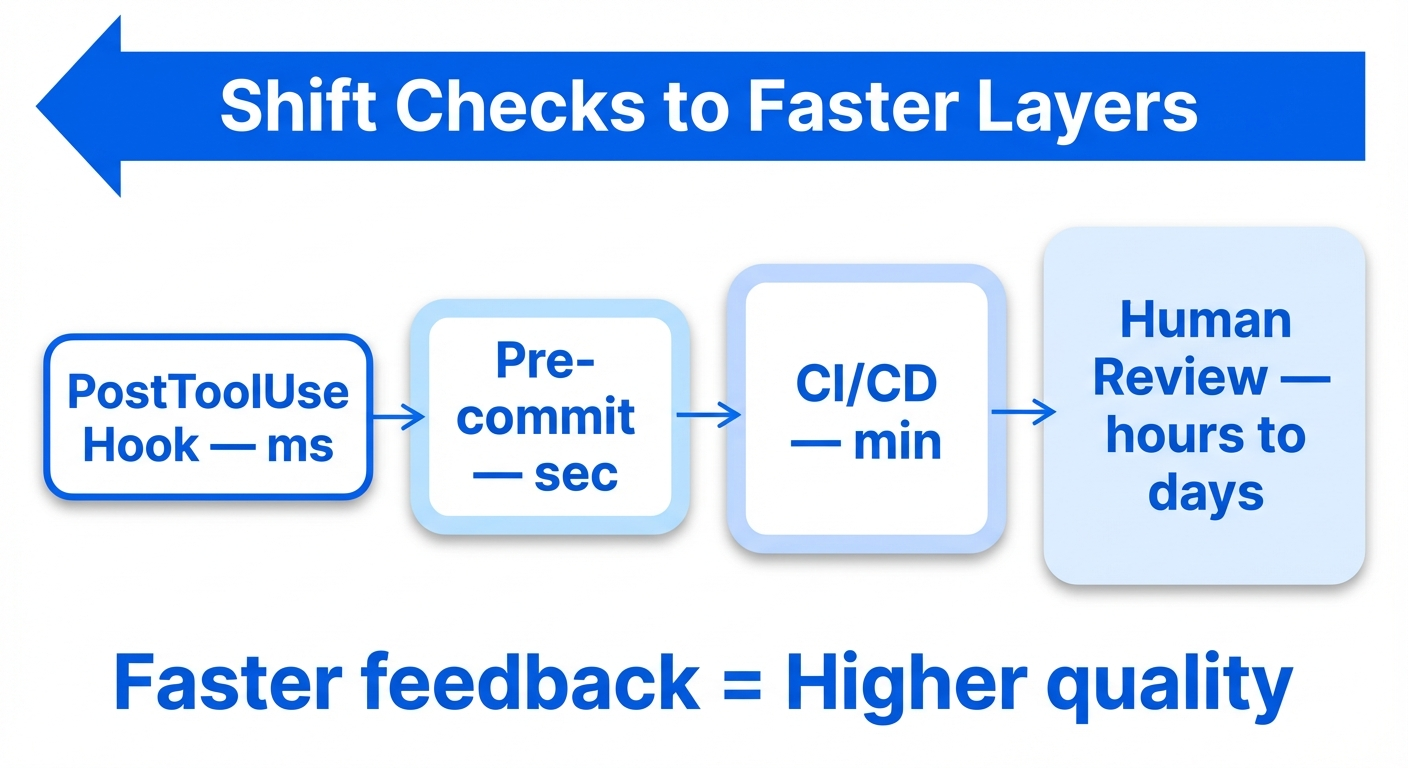
Feedback speed determines quality
The quality of a feedback loop is proportional to its speed.
- Fastest (ms): PostToolUse Hook → formatter auto-run. The agent is done fixing before it even notices the violation
- Fast (s): Pre-commit hook → linter / type check. Catch issues before commit
- Slow (min): CI/CD pipeline → full test suite. Catch issues before merge
- Slowest (hours to days): human code review. Catch issues after merge
The goal of harness engineering is to push as many checks as possible to the faster layers. Move linters that only run in CI into pre-commit hooks, and formatters that only run in pre-commit hooks into PostToolUse Hooks.
Turn architecture into a guardrail
Birgitta Böckeler (Thoughtworks) observes that paradoxically, boosting trust in AI-generated code requires constraining the solution space, not expanding it. Rules that feel restrictive to humans are compounding quality wins for agents.
In the OpenAI team's practice, each business domain is split into a fixed set of layers and dependency direction is strictly verified. Cross-cutting concerns (auth, telemetry, feature flags) are injected only through a single explicit interface (Providers). These constraints are enforced mechanically by custom linters and structural tests.
In the future, tech stacks and codebase structures may be chosen by "harness-friendliness" rather than flexibility. Statically typed languages give agents more structured feedback than dynamically typed languages. Standardized patterns increase the probability of agents producing correct code consistently.
Now that we've seen the importance of deterministic tools, how should we communicate these rules to agents? On to the design of AGENTS.md / CLAUDE.md.
3: Design AGENTS.md / CLAUDE.md as a pointer
What to write
- Routing: "run
npm test", "ADRs live in/docs/adr/", "verify architectural rules witharchgate check" - Prohibitions: each item points to an ADR or a linter rule
- The minimum commands for build / test / deploy
What not to write
- Explanations of the system's current state (code and tests are the source of truth)
- Explanations of the tech stack (agents can read package.json or go.mod)
- Verbose coding style guides (delegate to linters and formatters)
Size target
The shorter the better. The ideal is under 50 lines.
Anthropic's official docs say "under 200 lines", but that's an upper bound, not a target. Compliance rate drops as the number of instructions grows. IFScale showed that at 150–200 instructions, primacy bias (bias toward the earliest instructions) becomes pronounced and performance starts to degrade. Read it as "starts to break at 150" rather than "fine up to 150."
Claude Code's system prompt itself contains about 50 instructions, so a 100-line CLAUDE.md (AGENTS.md for Codex) gives the agent about 150 instructions total. Pile on long context files and critical instructions get buried.
Practical design:
- Aim for under 50 lines at the root. The minimum facts about the repo, plus pointers to available skills and MCP connections (Addy Osmani)
- On-demand loading for details. Split across Skills,
.claude/rules/files, and per-subdirectory AGENTS.md - Compress aggressively. Vercel compressed 40KB to 8KB and maintained a 100% pass rate
- For every line ask: "would removing this line cause the agent to make mistakes?" If no, delete it
When pointers rot
Pointer-style design has a nice side benefit. If the file path the pointer points to stops existing, you get an error equivalent to 404: rot becomes mechanically detectable. Descriptive documentation rots silently; broken pointers fail loudly.
We've looked at how to design instructions for agents. Next: how do we actually get the agent to execute tasks? On to separating planning from execution.
4: Separate planning from execution
The planning phase
Boris Tane (Cloudflare) puts it plainly: "Separating planning from execution is the single most important thing I do. It prevents wasted effort, keeps me in control of architectural decisions, and produces significantly better results with minimal token usage compared to jumping straight into code."
Have the agent produce a plan first, then a human reviews and approves it before execution starts. This is why many AI coding tools ship with a "plan mode."
Task granularity
From Anthropic: agents tend to try to do everything at once (the one-shot problem). Telling it explicitly to "work on only one feature at a time" avoids this. Decompose big goals into small building blocks, finish each, and then move on.
Verify completion with tests
Agents tend to declare features "done" without running end-to-end tests. Explicitly instruct them to run end-to-end tests with browser automation tools and completion judgements get dramatically more accurate (confirmed experimentally by Anthropic).
We've landed on "verify completion with tests." Next, how do we design E2E tests?
5: E2E test strategy: give agents "eyes" for every kind of app
If an agent has no way to "see" the code it wrote, it declares "done" as soon as compilation passes. By combining browser automation tools, the agent can manipulate the UI and verify it from the same vantage point as a human user. In Anthropic's long-running-agent experiments, introducing Puppeteer MCP for browser automation drove dramatic performance improvements. The agent could now find and fix bugs on its own that were invisible from the code alone.
Web apps: tool comparison (three approaches)
Anthropic's original study used Puppeteer MCP, but the Playwright ecosystem has evolved rapidly and as of March 2026 Playwright-family tools dominate.
1. Playwright MCP (Microsoft official)
Accessibility-tree-based interaction. You can reference and manipulate elements directly by role and name. Works with every major agent (Claude Code, Codex, Cursor, GitHub Copilot).
Pros: most mature ecosystem. Playwright v1.56+ ships three dedicated subagents (Planner, Generator, Healer). Planner builds exploration plans, Generator produces test code, and Healer auto-heals selectors when the UI changes. Generated tests are standard Playwright tests and run headless in CI.
Cons: the MCP tax is severe. 26+ tool definitions consume the context window, and the full accessibility tree (3,000+ nodes on complex sites) is returned per action. A typical browser automation task consumes about 114,000 tokens. Long sessions see noticeable context rot and accuracy drops.
Where it shines: use it to "generate" the test suite, and run the generated Playwright tests independently in CI.
2. Playwright CLI (@playwright/cli)
Same foundation as Playwright MCP but driven via shell commands instead of the MCP protocol.
Pros: roughly 4x more token-efficient than MCP. For the same task MCP consumes about 114,000 tokens and the CLI about 27,000. Accessibility snapshots and screenshots are stored in the filesystem instead of being dumped into the context window.
Where it shines: the main E2E testing tool for Claude Code or Codex. Prefer CLI over MCP. The win is biggest in long sessions where the context window is under pressure.
3. agent-browser (Vercel Labs)
A CLI built on Playwright with a snapshot + element reference (ref) pattern designed for agents.
Pros: most token-efficient. For the same 6 tests, Playwright MCP consumes about 31K characters while agent-browser consumes about 5.5K (5.7x test efficiency). Element references (@e1, @e2, ...) avoid CSS selector fragility. A Rust CLI means no Node.js cold start.
Cons: two months after release it's still rough around the edges. Windows support has multiple unresolved issues, docs are thin, and sometimes you have to read the source.
Recommendation: by use case
| Use case | Recommended tool | Why |
|---|---|---|
| Self-test loop | agent-browser or Playwright CLI | Token efficiency matters most |
| Test suite generation | Playwright MCP + subagents | 3-agent setup: Planner / Generator / Healer |
| Exploratory testing | agent-browser | Ref pattern is robust against selector breakage |
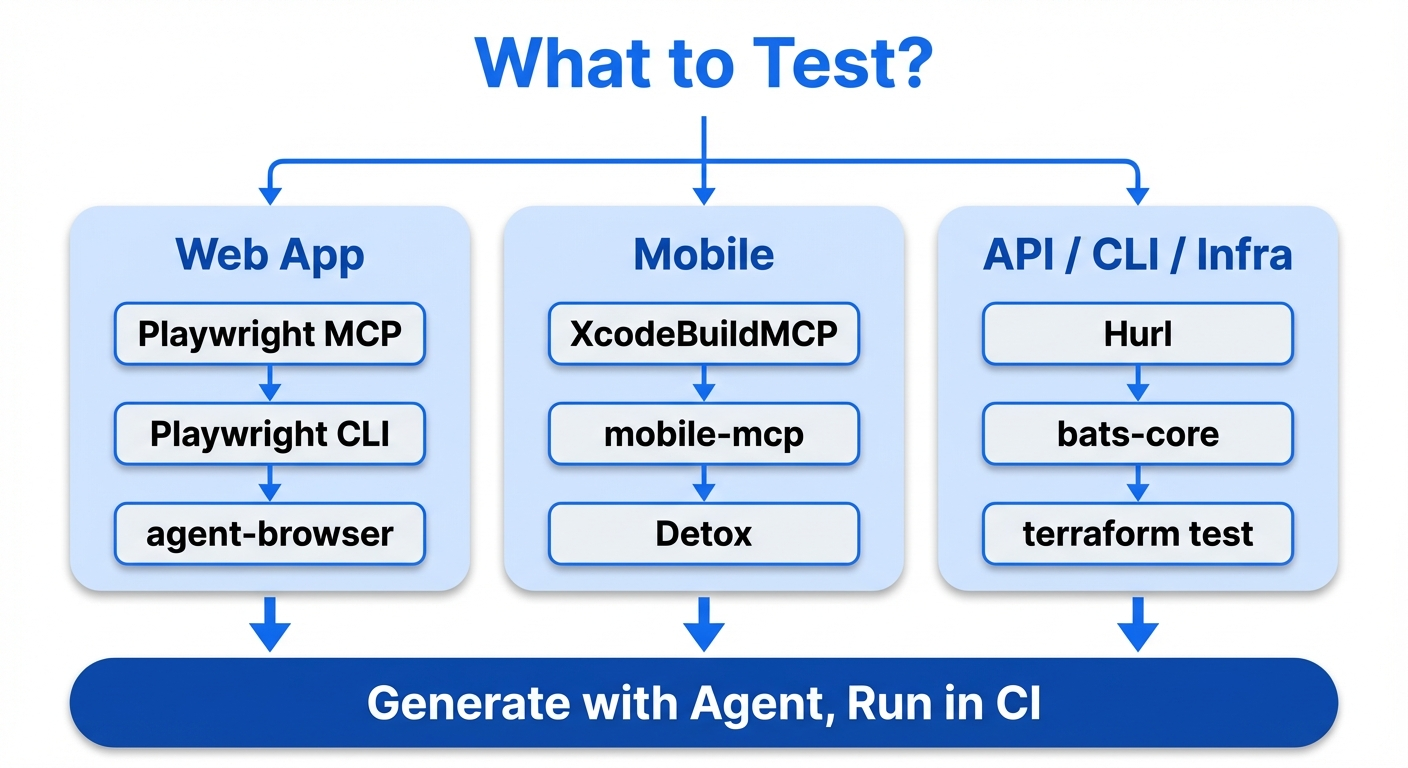
Universal principle: the accessibility tree is the universal interface
Looking back at the patterns that work for web apps, both Playwright MCP and agent-browser interact with the UI via the accessibility tree. Reading the UI as structured text instead of a screenshot lets the agent manipulate elements directly by role / name, keeps outputs deterministic, and makes CI assertions easy.
This principle isn't limited to the web. macOS, Windows, and Linux each have native accessibility APIs (NSAccessibility, UIAutomation, AT-SPI2) that let any GUI app be read as an accessibility tree of structured text.
Accessibility tree vs. screenshots: when to use each
When the accessibility tree is a good fit:
- Programmatic interaction: elements have role / name / state, so you can do
click element[name='Submit']. No coordinate guessing, stable - Deterministic testing: the same page returns the same tree every time. Diff and assert easily in CI
- Operation automation: form fills, navigation, button clicks, and other routine ops
When screenshots are a good fit:
- Visual bug detection: layout breakage, CSS issues, overlapping elements, color / font / padding problems
- Visual regression tests: "does this page look right?"
- Canvas / charts / maps / images: rich content not represented in the accessibility tree
- Spatial layout: element positioning, alignment, responsive behavior
Design principles common to all application types:
- Prefer structured text output: whatever you "show" the agent should be structured text (JSON, accessibility tree, CLI stdout) whenever possible
- Make verification deterministic: get the agent's generated tests into a deterministically runnable form. Don't put the agent itself into CI
- Close the feedback loop: build an environment where the agent can autonomously spin build → run → verify → fix
Mobile app E2E testing
State of play (March 2026)
Xcode 26.3 introduced native MCP support, letting Claude Agent and Codex run directly inside Xcode. Agents can autonomously generate, run, and fix XCTest, and verify visually via Xcode Previews screenshots. For iOS development, agent-driven E2E testing has moved from "experimental" to "production-ready."
Recommended tool stack
| Tool | Target | Notes |
|---|---|---|
| XcodeBuildMCP | iOS (Xcode 26.3) | Acquired by Sentry. 59 MCP tools. Returns build errors as structured JSON |
| iOS Simulator MCP Server | iOS Simulator | Via Facebook's IDB tool. Use v1.3.3 or later (earlier had a command-injection vulnerability) |
| mobile-mcp | iOS/Android | Platform-independent MCP. Interaction via the native accessibility tree |
| Appium MCP | iOS/Android | For existing Appium infrastructure. Up to 90% reduction in maintenance cost |
| Detox | React Native | Wix's gray-box testing. Monitors async operations to prevent flakes |
| Maestro MCP | Mobile in general | YAML scripts. Light setup, good for prototypes |
Mobile E2E decisions
| Axis | Recommendation |
|---|---|
| iOS-only project | XcodeBuildMCP + Xcode 26.3 native integration |
| Android-only project | mobile-mcp or Appium MCP |
| Cross-platform (React Native) | Detox (test generation) + mobile-mcp (exploratory testing) |
| Prototype / smoke test | Maestro MCP |
| Existing Appium infrastructure | Appium MCP |
The same "separate generation and execution" principle applies on mobile: generate tests via MCP tools, then run the generated XCTest / Detox / Espresso tests deterministically in CI.
CLI / TUI application E2E testing
CLI tools are the application type most naturally testable by agents. The agent can run shell commands itself, so no UI bridge is needed.
bats-core (Bash Automated Testing System) is great for testing Bash scripts. TAP-compliant output makes CI integration easy, and each test case runs in its own process so there's no state leakage.
# test/mycli.bats
@test "help flag shows usage" {
run ./mycli --help
[ "$status" -eq 0 ]
[[ "$output" == *"Usage:"* ]]
}
@test "invalid input returns error" {
run ./mycli --invalid-flag
[ "$status" -ne 0 ]
[[ "$output" == *"unknown flag"* ]]
}
Best practice: move the main logic of the script into a run_main function and wrap it with if [[ "${BASH_SOURCE[0]}" == "${0}" ]]; then run_main; fi. This lets bats source the script and test individual functions.
Use pexpect / expect for interactive CLIs. Prompt responses, timeouts, password input, and other interactive operations can all be controlled programmatically.
A CLI-oriented Stop hook example:
{
"hooks": {
"Stop": [
{
"matcher": "",
"hooks": [
{
"type": "command",
"command": "bash -c 'if [ -f ./test/cli.bats ]; then bats ./test/cli.bats 2>&1 | tail -20; fi'"
}
]
}
]
}
}
API / backend E2E testing
Verifying backend changes with only unit tests isn't enough. When an agent changes an API endpoint, you need E2E tests that actually fire HTTP requests and verify the response.
Hurl (by Orange, built on libcurl) is a CLI tool that defines HTTP requests and assertions in plain text. It's a lightweight Rust binary and pairs extremely well with agents. Its plain-text format is easy for agents to read and write, and the generated Hurl files can be executed deterministically in CI.
# test/api/users.hurl
POST http://localhost:3000/api/users
Content-Type: application/json
{
"name": "Test User",
"email": "[email protected]"
}
HTTP 201
[Asserts]
jsonpath "$.id" exists
jsonpath "$.name" == "Test User"
GET http://localhost:3000/api/users/{{id}}
HTTP 200
[Asserts]
jsonpath "$.email" == "[email protected]"
Pact (contract testing) verifies API contracts between microservices. Pact v4.0.0 (2026) improved GraphQL support, async message handling, and type safety via MatchersV2. A good workflow: have the agent generate consumer tests, then run provider verification in CI.
For gRPC testing, in addition to Pact-based contract tests, you can have the agent use grpcurl (curl equivalent for gRPC services from the CLI) directly for smoke tests on gRPC endpoints.
For database integration tests, use Testcontainers to spin up test DB containers and automate the migrate → seed → test → destroy cycle.
| Tool | Use | Agent fit |
|---|---|---|
| Hurl | HTTP API E2E tests | Best (plain text, CLI, deterministic) |
| Pact | Microservice contract tests | High (fits generate → CI-run pattern) |
| grpcurl | gRPC smoke tests | High (CLI-based) |
| Testcontainers | DB integration tests | Medium (needs setup but CI integration is well-established) |
Desktop app E2E testing
Electron apps
For testing Electron apps you have two approaches: classical and MCP-based.
Classical E2E testing:
- Playwright (
_electron.launch()): experimental but most widely used. Supports Electron v12.2.0+ and the full Page API. Main-process code execution, video recording, and screenshots are supported - WebdriverIO (wdio-electron-service v9.2.1): the most mature successor to the deprecated Spectron. Auto-detects bundle paths from Electron Forge and Electron Builder. Supports headless Xvfb execution for Linux CI
AI-agent-driven testing via MCP:
The Electron MCP Server space is fragmented with 9+ projects competing. No dominant standard yet.
| Project | Stars | Approach |
|---|---|---|
| amafjarkasi/electron-mcp-server | 60 | CDP (port 9222), process management, JS execution |
| circuit-mcp | 54 | Web (29 tools) + Desktop/Electron (32 tools), accessibility-first, auto snapshots |
| kanishka-namdeo/electron-mcp | 0 | 44 tools (6 categories), CDP + Playwright, record code → output tests |
| robertn702/playwright-mcp-electron | 5 | Official Playwright MCP fork + Electron-specific tools (electron_evaluate etc.) |
Official Playwright MCP (microsoft/playwright-mcp, 28.5k stars) has Electron support in development. Implementation commits for ElectronContextFactory and --electron-app flags are visible, but they haven't hit a stable release. Once official support lands the ecosystem is likely to converge.
All of these MCP servers share the approach of connecting to Electron via Chromium DevTools Protocol (CDP) and manipulating the UI through the accessibility tree. Electron can programmatically enable the Chromium accessibility tree via app.setAccessibilitySupportEnabled(true).
Tauri apps
Official tauri-driver: WebDriver interface supported on Windows / Linux. macOS is not supported (no WebDriver exists for Apple's WKWebView). You can run E2E tests with WebdriverIO or Selenium.
macOS alternatives:
- tauri-webdriver (Choochmeque): cross-platform W3C WebDriver server. Supports macOS / Windows / Linux via an embedded
tauri-plugin-webdriver. Published February 2026, very new - Tauri-WebDriver (Daniel Raffel): macOS only. JS bridge + CLI (
tauri-wd) architecture with MCP integration - @crabnebula/tauri-driver (CrabNebula): requires a paid subscription for macOS testing
MCP servers for Tauri:
- tauri-plugin-mcp (80 stars): Tauri plugin + MCP server. Screenshots, DOM operations, clicks, input, etc. 10 tools. IPC / TCP transport
- tauri-mcp (28 stars): process management, window operations, input simulation, IPC, etc. 12 tools. Windows / macOS / Linux (X11) support
Native desktop apps
TestDriver.ai (v7.4.5, 217 stars) is E2E testing via a Computer-Use SDK. Its own fine-tuned AI model understands UIs from screenshots and drives mouse / keyboard via hardware emulation. Tests are written in JavaScript / TypeScript (Vitest) with natural-language prompts describing the operations. GitHub Actions (testdriverai/action) auto-provisions an ephemeral Mac1 VM for CI runs. Because it doesn't need selectors or test IDs, it's especially good at hard-to-test areas like VS Code extensions, Chrome extensions, or OAuth flows.
Per-platform accessibility APIs
Through 2025–2026, MCP-based desktop automation tools have matured quickly.
| Platform | Accessibility API | Agent-facing tools |
|---|---|---|
| macOS | NSAccessibility / AXUIElement | macos-ui-automation-mcp (25 stars, PyObjC), mcp-server-macos-use (Swift, accessibility-tree-based), etc. |
| Windows | UIAutomation | Terminator (1.3k stars, "Playwright for Windows", Rust/TS/Python, MCP integration) |
| Linux | AT-SPI2 (pyatspi) | kwin-mcp (KDE Plasma 6 Wayland, 29 tools, isolated KWin sessions) |
| Electron (all OS) | Chromium Accessibility | circuit-mcp, Playwright MCP forks, etc. (see the Electron section above) |
For Windows in particular, Terminator leverages the UIAutomation API and claims a 95% operation success rate and 100x the speed of vision-only approaches, signaling the maturation of desktop accessibility automation.
Infrastructure / DevOps E2E testing
Infrastructure changes are made by agents just like application code, but the blast radius is much larger (destroying production, opening security holes). Verification with deterministic tools matters even more here.
Terraform
terraform test (the native testing framework) is available in Terraform v1.6+. It's written in HCL, so agents read and write it naturally.
Conftest + OPA runs policy checks on terraform plan output. Policies written in Rego let you deterministically enforce guardrails like "no public S3 buckets" or "minimum instance sizes in prod."
Terratest is an integration testing framework written in Go. Spin up real infrastructure in a sandbox, run tests, then tear it down.
Docker
container-structure-test (Google) verifies container image structure via YAML / JSON test definitions.
# container-structure-test.yaml
schemaVersion: "2.0.0"
commandTests:
- name: "node version"
command: "node"
args: ["--version"]
expectedOutput: ["v20\\..*"]
fileExistenceTests:
- name: "app entrypoint exists"
path: "/app/index.js"
shouldExist: true
metadataTest:
exposedPorts: ["3000"]
cmd: ["node", "index.js"]
Kubernetes
kubeconform schema-validates Kubernetes manifests. No runtime required, very fast. Conftest also applies OPA policies to Kubernetes manifests.
Infra E2E decisions
If you let agents make infrastructure changes, the following guardrails are essential.
- Block
terraform applyorkubectl applyagainst production directly in a PreToolUse hook - In a Stop hook, run
terraform test,conftest test, andkubeconform. Don't let the agent finish until they pass - Pipe
terraform planoutput through Conftest for policy checks and build an AI → CI verification → OPA approval → merge → ArgoCD apply flow - Make container-structure-test mandatory in CI for Docker image structure verification
AI / ML pipeline E2E testing
When agents build or modify AI / ML pipelines, you need to verify not just code correctness but also data quality, model performance, and overall pipeline consistency. Testing splits into six layers: data quality, model evaluation (benchmarks), application quality (LLM), agent evaluation, safety / guardrails, observability / drift detection.
Data pipeline testing
GX (Great Expectations) is a Python-based data quality validation framework (v1.14.0, 11.2k stars). GX Core 1.0 (August 2024) fundamentally rearchitected it into a 3-layer Data Source / Data Asset / Batch Definition structure. GX Cloud (managed SaaS) adds ExpectAI (AI-assisted automatic Expectation generation) and anomaly detection.
dbt Tests are SQL-based data transformation tests (dbt Core v1.11.7). dbt 1.8+ added unit tests as a first-class feature and renamed the tests: key to data_tests:. dbt's testing best practices are "apply unique + not_null to every model's primary key", "test assumptions on source data", and "risk-based approach" rather than a uniform numeric target. dbt-expectations (maintained by Metaplane, v0.10.10) provides GX-style Expectations as dbt macros.
Worth noting: in October 2025, dbt Labs announced a merger with Fivetran (pending regulatory approval). Fivetran also acquired Tobiko Data, the developer of SQLMesh, in September 2025. Major data transformation OSS tools are converging under one umbrella.
Competitors in data quality: Soda Core (v4.1.1, YAML / SodaCL language-based, pivoting to a "Data Contracts engine") and Elementary (dbt-native data observability).
Model evaluation (benchmarks)
lm-evaluation-harness (EleutherAI) is the de facto standard for academic benchmarks on LLMs. It powers the HuggingFace Open LLM Leaderboard and NVIDIA has integrated it into NGC containers and NeMo Microservices. In v0.4.10 (January 2026), the CLI moved to subcommands (lm-eval run, lm-eval ls tasks, lm-eval validate) and gained YAML config support. The same version also introduced a breaking change toward a lightweight core: pip install lm_eval no longer bundles backends, so you need explicit installs like lm_eval[hf] / lm_eval[vllm] / lm_eval[api].
LightEval (Hugging Face, 2.3k stars) is a lightweight evaluation framework by Hugging Face. It supports over 1,000 tasks with strong native integration with TGI and Inference Endpoints. Originally inspired by lm-evaluation-harness, it fits evaluation workflows inside the HF ecosystem. Open LLM Leaderboard v2 itself still uses lm-evaluation-harness (HF fork) as its backend.
They're complements, not competitors: lm-evaluation-harness is stronger on academic reproducibility and standardization, and LightEval is stronger on HF ecosystem integration. Neither is ideal for application-level evaluation or CI/CD integration. Other tools fit better.
Application quality evaluation (LLM)
LLM application quality tooling matured quickly across 2025 and 2026.
DeepEval (Confident AI, 14.0k stars) is a pytest-compatible LLM evaluation framework with 60+ metrics (RAG / agents / conversation / safety). CI/CD integration is native: you can run deepeval test run directly from GitHub Actions and similar.
promptfoo (10.9k stars) provides declarative YAML-based prompt testing, red-teaming, and vulnerability scanning with great CI/CD integration. Over 50 vulnerability plugins enable automated red-teaming.
RAGAS is a RAG-focused evaluation framework with metrics like Context Precision/Recall, Faithfulness, and Answer Relevancy. As of 2026 it also handles agent workflows, tool use, and SQL evaluation.
Continuous evaluation
As an enterprise standard in 2026, continuous evaluation is becoming established. Pre-deploy uses threshold-based quality gates (for example, faithfulness >= 0.85, hallucination rate <= 5%) in CI/CD. Post-deploy does drift detection and continuous scoring on production traffic. LLM-as-Judge has become the standard approach for automated evaluation; LangChain's survey reports 53.3% of organizations use LLM-as-Judge and 89% implement agent observability, while offline evaluation adoption sits at 52.4%.
Safety testing and guardrails
LLM safety testing requires dedicated tools.
Microsoft PyRIT (3.4k stars) is an enterprise-focused red-teaming tool integrated into Azure AI Foundry as the AI Red Teaming Agent. It ships 20+ attack strategies and Attack Success Rate (ASR) metrics.
Guardrails AI is an LLM output validation framework that composes Input / Output Guards out of pre-built validators from its Hub. The Guardrails Index (February 2025) is the first benchmark comparing 24 guardrails across 6 categories.
NVIDIA NeMo Guardrails is a programmable guardrails toolkit supporting input, dialogue, and retrieval rails.
Anthropic has developed Constitutional Classifiers, which after 3,000+ hours of expert red-teaming surfaced no universal jailbreak. The production-refusal-rate increase is just 0.38% and inference overhead is 23.7%.
On regulation, the EU AI Act's full obligations for high-risk AI are scheduled to take effect on August 2, 2026, mandating adversarial testing in quality management, risk management, and conformity assessment. The NIST AI RMF TEVV (Testing, Evaluation, Verification, Validation) is also established as a structured evaluation approach.
Summary
| Layer | Test tools | Automation pattern |
|---|---|---|
| Data quality | GX Core/Cloud, Soda Core, Elementary, dbt Tests | Pipeline-runtime assertions, Data Contracts |
| Model performance (benchmarks) | lm-evaluation-harness, LightEval, HELM, Inspect AI | Baseline comparison, declarative YAML |
| Application quality (LLM) | DeepEval, promptfoo, RAGAS | pytest / CI integration, LLM-as-Judge |
| Agent evaluation | Maxim AI, LangSmith, Arize Phoenix, Langfuse | Tracing + offline / online eval |
| Safety / guardrails | PyRIT, promptfoo, Guardrails AI, NeMo Guardrails | CI/CD gating, Constitutional Classifiers |
| Observability / drift detection | Arize, WhyLabs, Evidently AI, Langfuse | Real-time monitoring, automatic alerts |
Universal E2E principles
Patterns common to every application type:
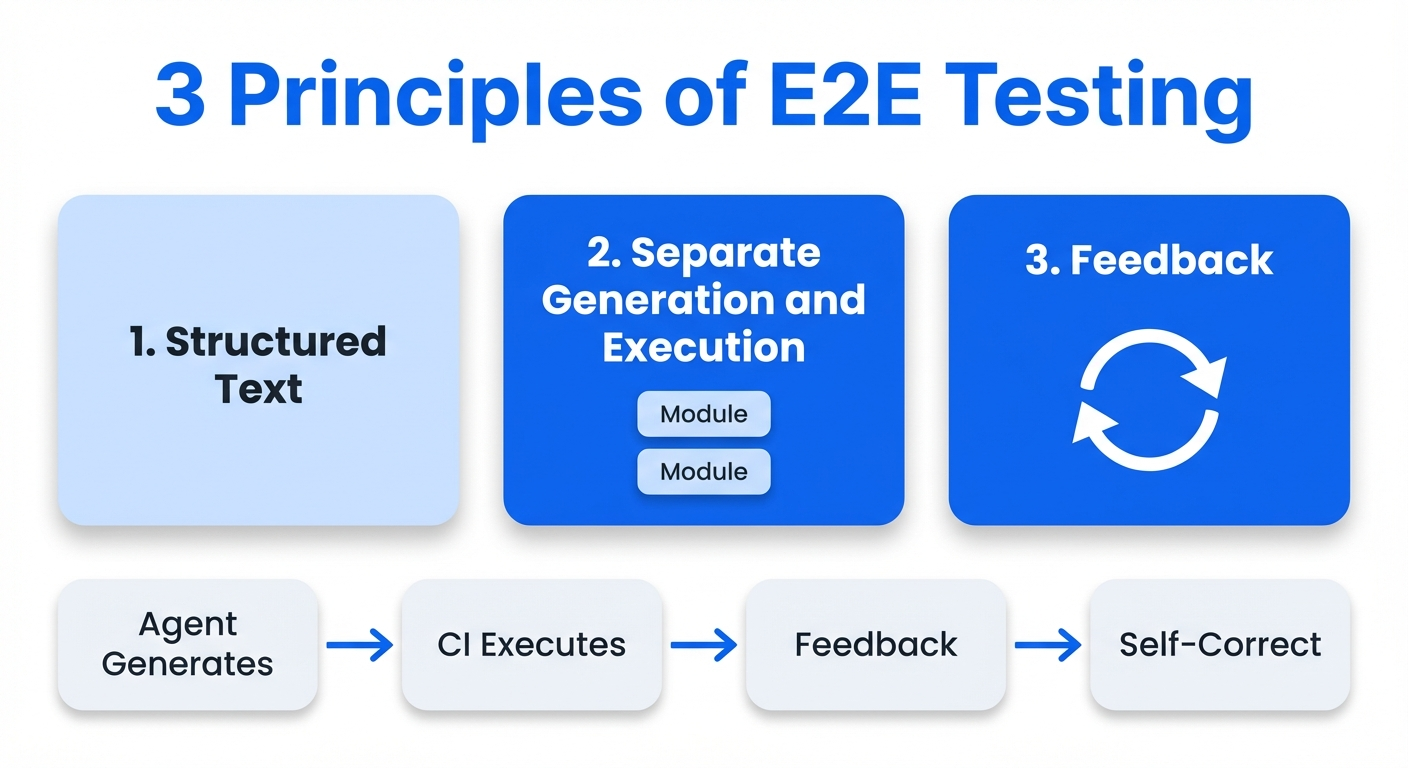
The structured-text interface per application type:
| App type | Structured-text interface |
|---|---|
| Web | Accessibility tree (Playwright / agent-browser) |
| Mobile | Accessibility tree (mobile-mcp / XcodeBuild) |
| CLI | stdout / stderr (bats / pexpect) |
| API | HTTP responses (Hurl) |
| Desktop | Accessibility tree (Terminator / circuit-mcp / macos-ui-automation-mcp) |
| Infra | Plan output / schema (terraform test / conftest) |
| AI/ML | Evaluation metrics (lm-eval-harness / LightEval / GE) |
The shared principle: return verification results as feedback to the agent and close the self-correction loop.
Verification strategies for animations and transitions
Screenshots and accessibility trees capture the static state at a moment in time. Time-dependent behavior like animations, transitions, and scroll-linked UIs can't be verified this way.
Layered verification strategy
| Layer | Timing | Technique |
|---|---|---|
| Layer 1 | PostToolUse (ms) | Guarantee animation completion with the getAnimations() API |
| Layer 2 | PostToolUse (ms) | Measure CLS (Cumulative Layout Shift) |
| Layer 3 | CI (s) | Freeze animations + snapshot compare |
| Layer 4 | Stop Hook | Capture frame sequences at 5fps → agent inspects them directly |
Layer 1: deterministic verification via getAnimations()
Use the Web Animations API's getAnimations() to wait for animations to finish before running assertions. This gets you off timing-dependent waitForTimeout.
// Pattern for waiting on animation completion in Playwright
async function waitForAnimationsComplete(page: Page, selector: string) {
await page.locator(selector).evaluate((el) => {
return Promise.all(
el.getAnimations({ subtree: true }).map((a) => a.finished)
);
});
}
// Example: modal open/close animation
test('modal opens with animation', async ({ page }) => {
await page.click('[data-testid="open-modal"]');
const modal = page.locator('[role="dialog"]');
await waitForAnimationsComplete(page, '[role="dialog"]');
await expect(modal).toBeVisible();
await expect(modal).toHaveScreenshot('modal-open.png');
});
Layer 2: measuring CLS (Cumulative Layout Shift)
Measure layout shifts with the PerformanceObserver API and fail the test if a threshold is exceeded.
async function measureCLS(page: Page, action: () => Promise<void>): Promise<number> {
await page.evaluate(() => {
(window as any).__clsScore = 0;
new PerformanceObserver((list) => {
for (const entry of list.getEntries() as any[]) {
if (!entry.hadRecentInput) {
(window as any).__clsScore += entry.value;
}
}
}).observe({ type: 'layout-shift', buffered: true });
});
await action();
return page.evaluate(() => (window as any).__clsScore);
}
test('accordion animation has no layout shift', async ({ page }) => {
const cls = await measureCLS(page, async () => {
await page.click('[data-testid="accordion-toggle"]');
await waitForAnimationsComplete(page, '.accordion-content');
});
expect(cls).toBeLessThan(0.1); // "good" CLS threshold
});
Layer 3: visual regression (freeze animations)
Chromatic, Percy, and Argos CI freeze CSS animations with animation: none !important and disable transitions, then compare screenshots.
/* Styles Chromatic/Percy auto-inject (conceptual) */
*, *::before, *::after {
animation-duration: 0s !important;
transition-duration: 0s !important;
}
Layer 4: low-FPS frame capture for agent-visual verification
Multimodal Coding Agents can look at images directly. Leverage that by capturing animations at a low FPS (around 5fps) and letting the agent read the frame sequence to verify "motion."
A 2-second animation × 5fps = 10 frames. Each frame is processed by the vision encoder at a few hundred tokens, so even the total stays at a practical few thousand tokens.
async function captureAnimationFrames(
page: Page,
action: () => Promise<void>,
options: { fps?: number; durationMs?: number; outputDir?: string } = {}
) {
const { fps = 5, durationMs = 2000, outputDir = 'test-results/animation-frames' } = options;
const interval = 1000 / fps;
const totalFrames = Math.ceil(durationMs / interval);
const frames: string[] = [];
await fs.mkdir(outputDir, { recursive: true });
const capturePromise = (async () => {
for (let i = 0; i < totalFrames; i++) {
const path = `${outputDir}/frame-${String(i).padStart(3, '0')}.png`;
await page.screenshot({ path, fullPage: false });
frames.push(path);
await page.waitForTimeout(interval);
}
})();
await action();
await capturePromise;
return frames;
}
Integrating into the feedback loop
Running frame capture every time is heavy, but "only when a change could affect animations" is practical. Use git diff to scope.
{
"hooks": {
"Stop": [
{
"matcher": "",
"hooks": [
{
"type": "command",
"command": "bash -c 'git diff --name-only HEAD | grep -qE \"\\.(css|scss|less)$|animation|transition|motion|framer\" && npx playwright test --grep @animation --reporter=line 2>&1 | tail -30 || echo \"No animation-related changes, skipping.\"'"
}
]
}
]
}
}
For mobile, on iOS XCTOSSignpostMetric can measure animation hangs and frame drops, and on Android dumpsys gfxinfo gets you equivalent frame stats.
We've covered E2E testing strategy comprehensively. On to state management across sessions.
6: Design state management across sessions
The shape of the problem
Each agent session has no memory of the previous one. It's like a shift-based factory where a new worker shows up every time with no handover.
Standardize the startup routine
Anthropic's pattern: at the start of each session, have the agent do the following.
- Verify the working directory
- Read the Git log and progress file
- Pick the next highest-priority task from the feature list
- Start the dev server and sanity-check basic functionality
This routine lets you immediately detect and repair broken state from a previous session.
Use Git as the bridge between sessions
At the end of each session, commit with a descriptive commit message. The next session's git log --oneline -20 becomes the most reliable "what happened" record. The Git log is tied one-to-one with code changes, so unlike descriptive docs it resists rot structurally.
Use JSON for progress records
From Anthropic: JSON is a better format than Markdown for feature lists and progress records. The model is less likely to edit or overwrite JSON-shaped data inappropriately than Markdown. That said, this is a short-project technique. For long projects, consider using the test suite itself as a substitute for the feature list to handle the feature list rotting.
Session management handled. Last principle: platform-specific harness strategies.
7: Understand platform-specific harness strategies: Codex vs. Claude Code
The harness matters more than the model
Morph's analysis is striking. For the same model, swapping the harness changes SWE-bench scores by 22 points, but swapping the model itself changes scores by only 1 point. What determines productivity isn't which platform you pick, but how thoroughly you can bake that platform's native capabilities into your harness.
Fundamental architectural differences
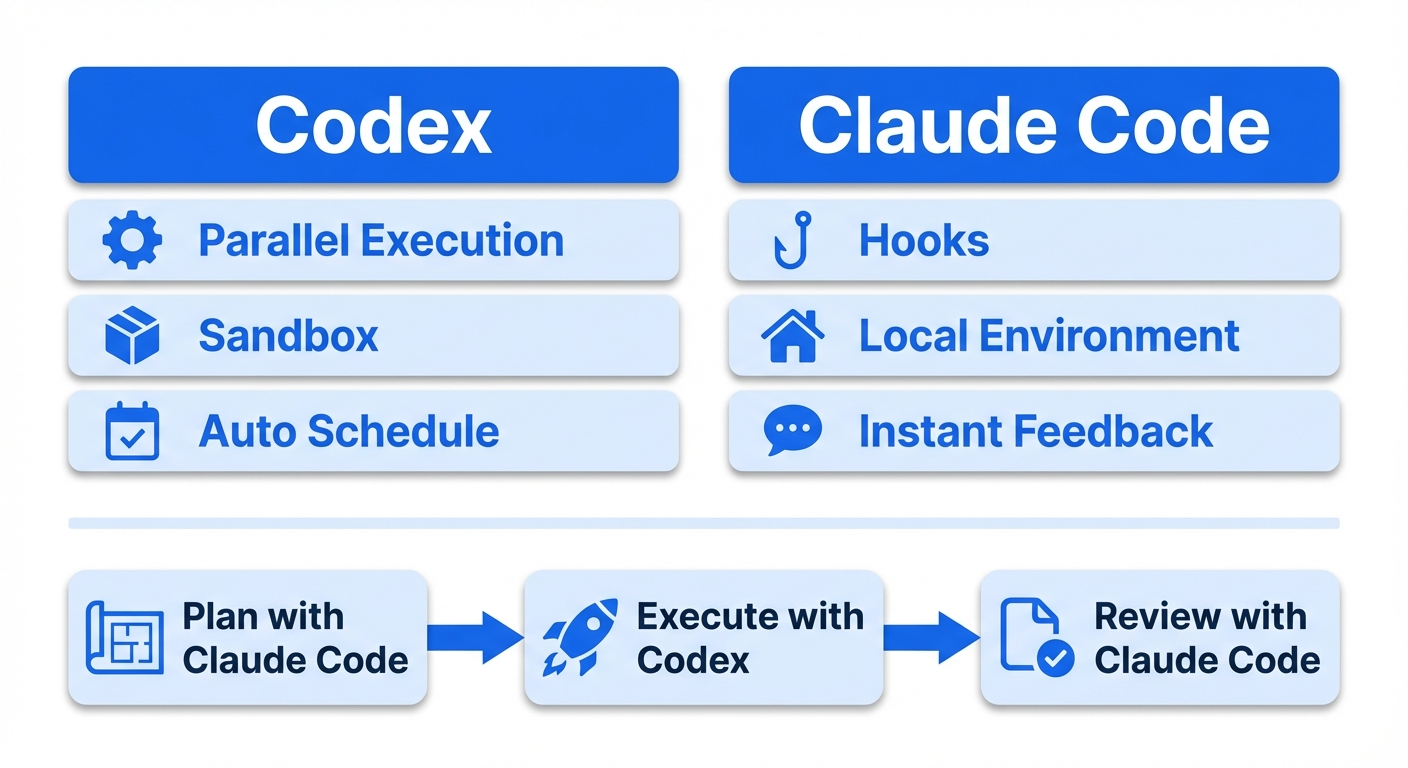
Codex is "closed-room". It brings a copy of the code into a cloud sandbox (a network-isolated container), works independently, and returns the finished diff. It can run multiple tasks asynchronously in parallel.
Claude Code is "workshop-style." It enters the developer's environment directly and edits files and runs commands locally. The Hooks system lets you insert deterministic control before / after tool execution.
Codex-specific harness features
| Feature | Description | Harness impact |
|---|---|---|
| Cloud sandbox execution | Parallel task execution in network-isolated containers | AGENTS.md instructions are reproduced faithfully inside the sandbox, so you can design a harness free of local environment differences |
| Async task queue | Background parallel execution of multiple tasks via codex cloud exec |
You can submit multiple tasks in parallel under one AGENTS.md and dramatically speed up the harness verification cycle |
| Automations | Scheduled recurring tasks (currently local execution while the app is running) | Lint runs and code-quality scans driven by AGENTS.md can be scheduled |
| App Server protocol | Unifies all client surfaces (CLI, VSCode, Web) via bidirectional JSON-RPC | The same AGENTS.md and sandbox settings apply regardless of which client you use |
| Realtime steering | Send additional instructions to a running agent via the turn/steer method |
Correct harness instructions mid-task to reduce re-run costs |
| Agents SDK integration | Expose Codex CLI as an MCP server via codex mcp-server |
Call Codex tasks programmatically from an external orchestrator |
| Hooks system (experimental) | 5 lifecycle hooks: SessionStart / PreToolUse / PostToolUse / UserPromptSubmit / Stop | Introduced in rust-v0.117.0 (2026-03-26). Pre/PostToolUse covers Bash only. Configured in hooks.json |
notify hook (to be deprecated) |
Run an external command on task completion (JSON payload) | Slated for deprecation with the arrival of Hooks |
The rust-v0.117.0 release on March 26, 2026 introduced an experimental Hooks system in Codex. It supports the same 5 lifecycle events as Claude Code (SessionStart, PreToolUse, PostToolUse, UserPromptSubmit, Stop). Configuration goes in ~/.codex/hooks.json or <repo>/.codex/hooks.json, and a feature flag must be enabled in config.toml.
[features]
codex_hooks = true
The config schema is very similar to Claude Code's. You get matcher-based filtering, feedback injection via hookSpecificOutput.additionalContext, and blocking via PreToolUse's permissionDecision (allow / deny / ask).
{
"hooks": {
"PreToolUse": [
{
"matcher": "Bash",
"hooks": [
{
"type": "command",
"command": "python3 .codex/hooks/pre_tool_use_policy.py",
"statusMessage": "Checking Bash command"
}
]
}
]
}
}
An important limitation as of now: the tool targeted by PreToolUse / PostToolUse is Bash only (the schema defines tool_name as const: "Bash"). Claude Code hooks can match Write / Edit / MultiEdit and other file-op tools, but Codex can't. That said, since Codex's architecture performs file operations via Bash, Bash hooks alone give you essentially the same coverage as Claude Code's matcher: "Write|Edit|MultiEdit". You can build quality gates by parsing the Bash command content to identify the target file and running linters.
Also note that Windows support is temporarily disabled. The legacy notify hook is slated for deprecation.
Previously, GitHub Discussion #2150 had 83+ people requesting a Claude Code-equivalent Hooks system, and Issue #2109 had 475+ upvotes. This request has finally been fulfilled.
So Codex Hooks is still an experimental Bash-only feature, but the gap between the two platforms' harness capabilities is closing fast. Compare it with the Claude Code-specific feature table below to see the current delta.
Claude Code-specific harness features
| Feature | Description | Harness impact |
|---|---|---|
| Hooks system | PreToolUse / PostToolUse / Stop / PreCompact and other lifecycle hooks | Unlike Codex Hooks (experimental, Bash only), all tools (Write / Edit / MultiEdit / Bash, etc.) are covered in a stable release |
| PreToolUse blocking | Deterministically block actions before tool execution | Mechanically enforce security policies like banning .env edits and preventing rm -rf |
| PostToolUse quality loop | On every file edit: linter → JSON additionalContext injection → self-correction | Closes the gap between "almost every time" and "every time without exception" |
| PreCompact hook | Protect important information before compaction | Mitigate information loss in long sessions |
| MCP Tool Search | On-demand loading of tool descriptions reduces context consumption by up to 85% | Prevents performance degradation with many MCP server connections |
| Agent Teams (experimental) | Direct communication and coordination between multiple sessions | Direct messages between teammates |
| Plan Mode + Extended Thinking | Read-only planning mode (40–60% token reduction) + dynamic thinking-depth adjustment | Higher reasoning quality on complex design decisions |
Things both platforms can do with different approaches
Linter integration: both support "run lint on each tool execution → inject as additionalContext → self-correct" via a PostToolUse Hook. Codex Hooks is experimental and Bash-only (since Codex file operations go through Bash, coverage itself is fine). Claude Code offers finer granularity with direct matching on Write / Edit / MultiEdit.
E2E testing: Claude Code is better for test generation (quality via the feedback loop); Codex is better for parallel test execution (async execution in the sandbox).
Multi-agent: Codex (role-based orchestration via Agents SDK + MCP) fits large-scale pipelines; Claude Code (Agent Teams) fits exploratory coordination.
Hybrid strategy: plan with Claude Code, execute with Codex
As of 2026, many professionals adopt a hybrid setup where Claude Code plans and designs → Codex executes in parallel → Claude Code reviews and polishes.
Shared harness layer (used by both platforms):
- AGENTS.md (AAIF standard, a common format read by major Coding Agents including Codex / Cursor / Devin / Gemini CLI / GitHub Copilot). On Claude Code, CLAUDE.md is the equivalent file; AGENTS.md is not loaded natively. To manage both, include it via
@AGENTS.mdreference inside CLAUDE.md - Skills (SKILL.md, released by Anthropic as an open standard and adopted by OpenAI in the same format)
- MCP configuration
- ADRs, linter / formatter settings, test suites
Platform-specific layer:
- CLAUDE.md +
.claude/settings.json: Claude Code-specific Hooks config, Plan Mode instructions, lifecycle hook definitions - Codex Automations config: schedules for recurring tasks
~/.codex/AGENTS.override.md: high-priority overrides for temporarily overriding AGENTS.md during release freezes or incident response
Decision framework
| Top priority | Recommendation | Why |
|---|---|---|
| Quality | Claude Code primary (Codex is catching up) | Claude Code Hooks is stable and covers all tools. Codex Hooks is experimental, but you can build equivalent quality gates via Bash |
| Throughput | Codex primary | Async sandboxed parallel execution has no equivalent |
| Both | Build the harness in Claude Code → scale execution in Codex | Harness quality determines reliability at scale |
Anti-patterns
We've gone through best practices. Let's also lock in what not to do.
- Relying only on prompts: writing "remember to write tests before you commit" in the agent's instructions isn't enough. Force test execution in a pre-commit hook. Solve it with mechanisms, not requests
- Accumulating explanatory docs in the repo: instead of writing "this service depends on X and Y" in a README, represent the dependencies in type definitions or schemas and verify with structural tests. It rots less
- Bloating AGENTS.md / CLAUDE.md: the AGENTS.md of WPBoilerplate (a WordPress plugin boilerplate) is over 1,000 lines. It burns through massive context before the first question is even asked. Aim for under 50 lines
- Building agent-only infrastructure: Stripe's lesson generalizes best: "don't build agent-only infrastructure. Build excellent developer infrastructure. Agents benefit automatically"
- Scaling without a harness: scaling the number of agents without a harness creates compounding cognitive debt, not compounding leverage. Polish your harness with one agent first, then scale
Minimum Viable Harness (MVH)
You don't need to adopt all of the principles above at once. Build it up in this order.
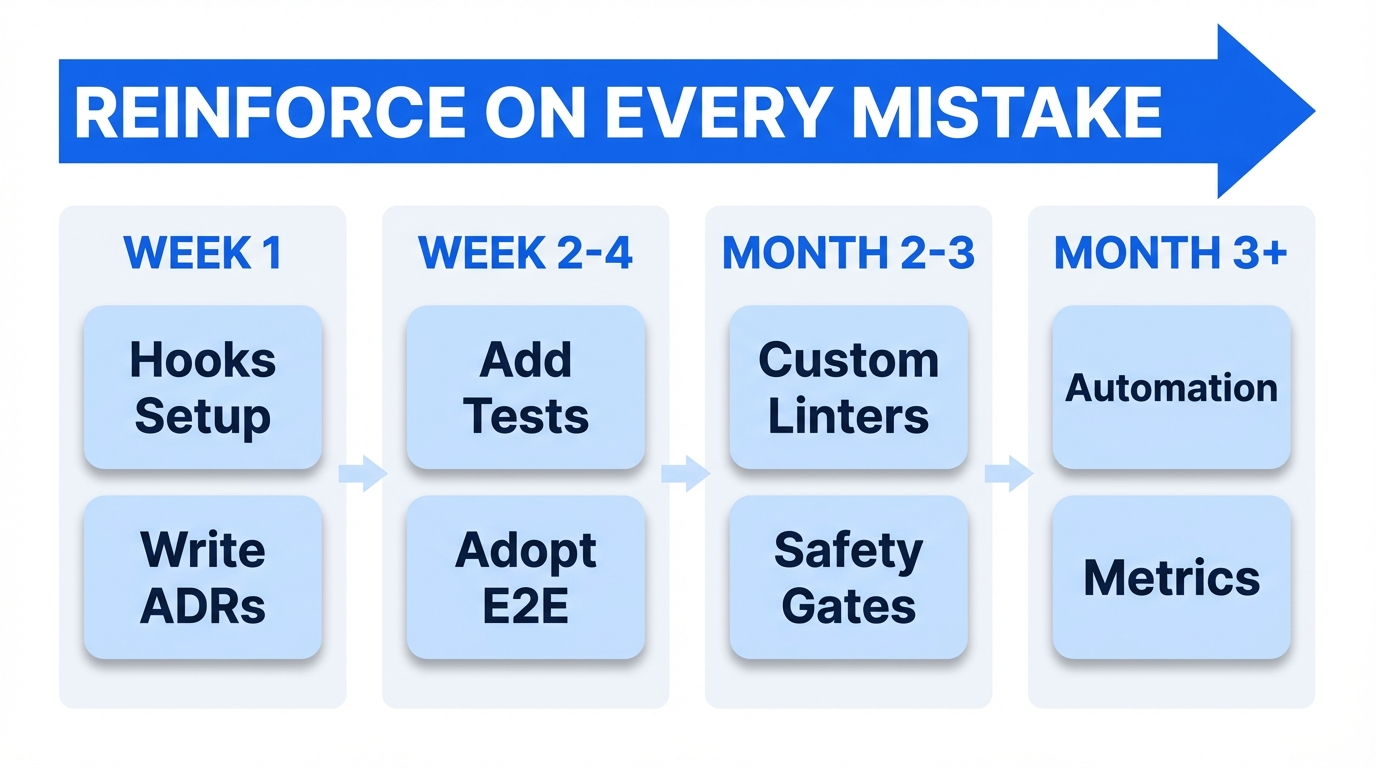
Week 1
- Write AGENTS.md / CLAUDE.md (as a pointer only, aim for under 50 lines)
- Set up pre-commit hooks (Lefthook recommended) to run linters / formatters / type checks
- Configure a PostToolUse Hook for auto-formatting (see the JSON example in Principle 2)
- Write your first ADR
Week 2–4
- Every time the agent makes a mistake, add a test or a linter rule
- Establish the plan → approve → execute workflow
- Introduce an E2E testing tool (Playwright CLI or agent-browser)
- Make passing tests the completion condition via a Stop Hook
- Standardize the session startup routine
Month 2–3
- Build custom linters and bake fix instructions into their error messages (reference ADRs)
- Start linking ADRs and linter rules (archgate pattern)
- Gradually remove descriptive docs from the repo and replace them with tests and ADRs
- Set up safety gates with PreToolUse Hooks (protect sensitive files, block destructive commands)
Month 3+
- Consider advanced feedback loops like the Plankton pattern
- Introduce garbage-collection processes (based on deterministic rules)
- Try running multiple agents simultaneously and learn your own management ceiling
- Quantitatively measure the harness's effectiveness (PRs/day, rework rate, review-comment rate)
Wrap-up
- The core of harness engineering is "enforce quality with mechanisms, not prompts." The combination of linters, Hooks, tests, and ADRs compounds
- Feedback should be as fast as possible. Push checks to the fastest layer in order: PostToolUse Hook (ms) > pre-commit (s) > CI (min) > human review (h)
- You don't need to adopt it all at once. Start with the MVH and reinforce the harness every time the agent makes a mistake
2026-03-29 update
The Hooks system was introduced experimentally in Codex via rust-v0.117.0 (released 2026-03-26), so I updated Chapter 7 "Codex vs Claude Code": the Codex-specific feature table, the claim that Codex had no Hooks, the linter integration comparison, and the decision framework. Codex Hooks covers the same 5 events as Claude Code (SessionStart / PreToolUse / PostToolUse / UserPromptSubmit / Stop), with the main difference being that Pre/PostToolUse only targets the Bash tool (the schema has const: "Bash"). Because Codex performs file operations via Bash, you can get equivalent practical coverage, but you cannot match Write / Edit / MultiEdit directly like Claude Code does.
2026-03-11 update
Based on Claude Code Hooks follow-up experiments after publication, I revised parts of the Hooks chapter. The Hooks examples in this post assume settings-based hooks placed in .claude/settings.json or .claude/settings.local.json. Also, the way to return feedback to Claude in PostToolUse is now docs-compliant JSON that returns hookSpecificOutput.additionalContext, not ordinary stdout. Frontmatter hooks and plugin / marketplace behavior differences are tracked as separate follow-up items. The reproduction repo for the follow-up experiments is at https://github.com/nyosegawa/claude-hook-experiment.
References
Primary sources
- Harness engineering: leveraging Codex in an agent-first world (OpenAI Engineering Blog)
- My AI Adoption Journey (Mitchell Hashimoto)
- Effective harnesses for long-running agents (Anthropic Engineering)
- Harness Engineering (Birgitta Böckeler / Thoughtworks)
- The Emerging 'Harness Engineering' Playbook (Charlie Guo)
- Minions: Stripe's one-shot, end-to-end coding agents (Stripe)
- Minions Part 2 (Stripe)
Claude Code / Codex
- Claude Code Hooks Guide (Anthropic)
- Claude Code Hooks Reference (Anthropic)
- Claude Code Memory (Anthropic)
- Agent Teams (Anthropic)
- MCP Tool Search (Anthropic)
- Advanced tool use (Anthropic)
- Introducing Codex (OpenAI)
- Codex Automations (OpenAI)
- Codex App Server (OpenAI)
- Codex Agents SDK (OpenAI)
- Codex Hooks (OpenAI)
- Codex Hooks Schema (OpenAI)
Linter tools
- Oxlint 1.0 (VoidZero)
- Biome v2.0 (Biome)
- Ruff (Astral)
- golangci-lint
- rust-magic-linter (vicnaum)
- SwiftLint (Realm)
- detekt
- Factory.ai ESLint Plugin (Factory.ai)
- eslint-plugin-local-rules
- ast-grep
- Lint Against the Machine (Montes)
E2E testing
- Playwright Agents (Shipyard)
- Playwright CLI Agentic Testing (Awesome Testing)
- agent-browser (Vercel Labs)
- agent-browser + Pulumi (Pulumi)
- XcodeBuildMCP (Sentry)
- mobile-mcp (Mobile Next)
- Appium MCP
- Detox (Wix)
- Maestro
- bats-core
- Hurl (Orange)
- Pact
- Testcontainers
- circuit-mcp
- Playwright MCP (Electron support in development)
- wdio-electron-service
- tauri-plugin-mcp
- TestDriver.ai
- Terminator
- macos-ui-automation-mcp
- kwin-mcp
Infra / DevOps
- Terraform Test (HashiCorp)
- Conftest (OPA)
- Terratest (Gruntwork)
- container-structure-test (Google)
- kubeconform
AI / ML
Data quality
- GX Core / GX Cloud (Great Expectations)
- Soda Core (Soda)
- Elementary (Elementary Data)
- dbt Tests / Unit Tests (dbt Labs)
- dbt-expectations (Metaplane)
Model evaluation / benchmarks
- lm-evaluation-harness (EleutherAI)
- LightEval (Hugging Face)
- HELM (Stanford CRFM)
- Inspect AI (UK AISI)
LLM evaluation / CI/CD integration
- DeepEval (Confident AI)
- promptfoo
- RAGAS
- Demystifying Evals for AI Agents (Anthropic)
- State of Agent Engineering (LangChain)
Safety / guardrails
- PyRIT (Microsoft)
- Guardrails AI
- NeMo Guardrails (NVIDIA)
- Constitutional Classifiers (Anthropic)
- EU AI Act Guide 2026
Observability / drift detection
Other
- Writing a good CLAUDE.md (HumanLayer)
- How Many Instructions Can LLMs Follow at Once?
- Stop Using /init for AGENTS.md (Addy Osmani)
- AGENTS.md outperforms skills (Vercel)
- archgate
- ADR (Michael Nygard)
- Lefthook + Claude Code
- Plankton / everything-claude-code
- What Is Context Rot? (Morph)
- Best AI Model for Coding (Morph)
- Harness Engineering 101 (muraco.ai)
- Claude Code vs OpenAI Codex (Northflank)
- AAIF (Linux Foundation)
- Xcode 26.3 Agentic Coding (Apple)
- From vibes to engineering (The New Stack)
- Chromatic Animation Docs
- iOS Simulator MCP Server