How far can the OpenAI Decisions API go on image recognition tasks? A comparison with other methods
by 逆瀬川ちゃん
19 min read
Hi there! This is Sakasegawa-chan (@gyakuse)!
Today I'd like to look at the OpenAI Decisions API, released in beta on October 6, 2026, and see how accurate it is on image recognition tasks, comparing it with good old trained image models, the Responses API, and a coding agent.
The Decisions API takes questions like "Is there a scratch in this image?" or "What type of document is this?" and returns the answer as probabilities instead of text. OpenAI says it is about 10x faster than the Responses API, and positions it for classification and routing.
A classification API sounds like it should work for image recognition out of the box. But image recognition already has a strong competitor: dedicated models trained on labeled data. So I prepared five tasks of different kinds (image classification, multi-label classification, action anticipation, and anomaly detection) and compared six methods on the same test sets.
About the OpenAI Decisions API
Let's start with what the Decisions API is.
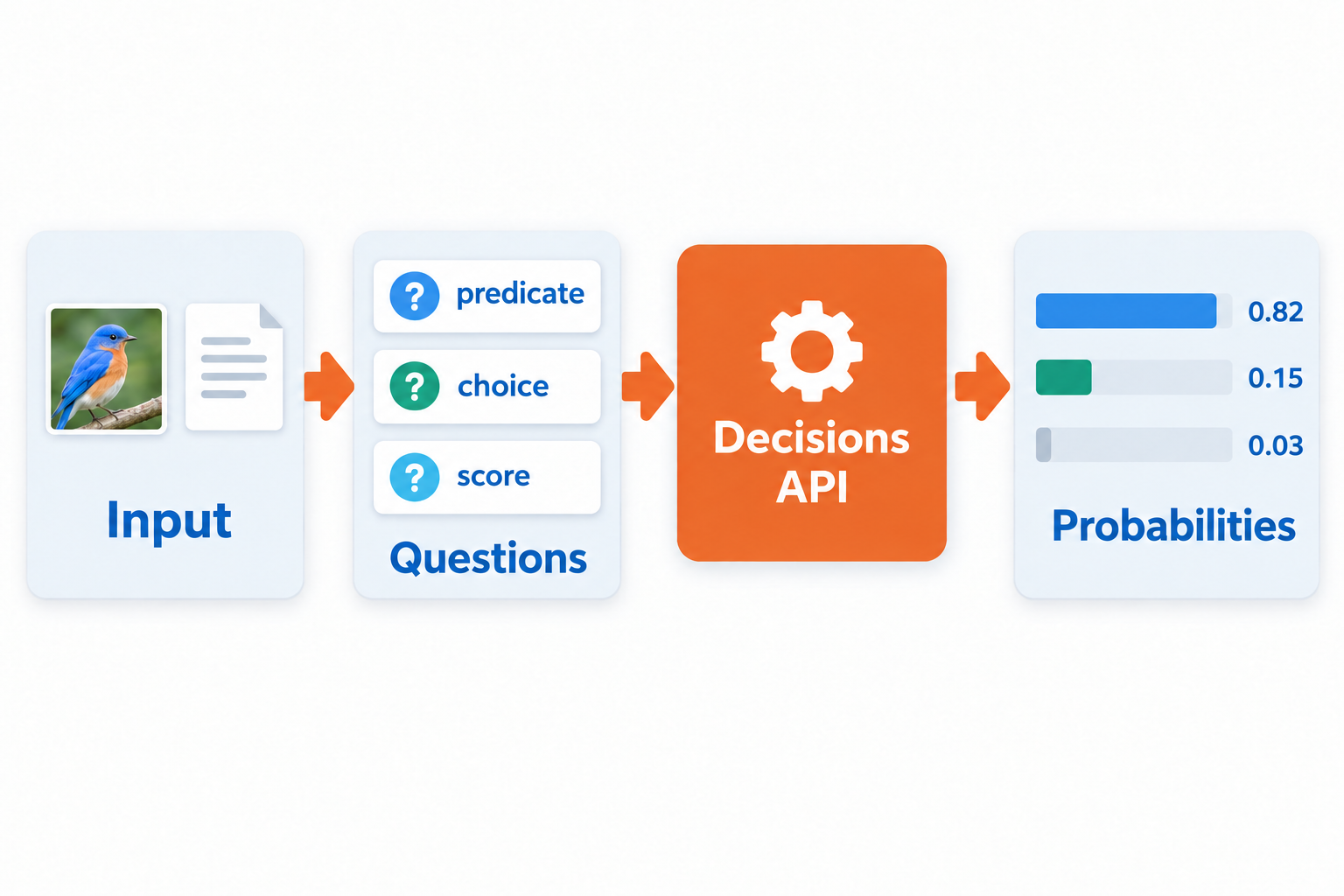
You send the Decisions API something to judge (text, images, or both) and a list of questions. For each question, you write the criteria in natural language as instructions, and the model returns each answer as probabilities. The endpoint is POST /v1/decisions, and the only supported model right now is gpt-6-luna.
There are three question types.
| Type | What you specify | What you get back | Example |
|---|---|---|---|
predicate |
Only instructions |
probability that the condition is true |
"The product has a scratch" |
choice |
2 to 255 candidates | The chosen choice, per-candidate probabilities, and confidence |
"Which of 16 document types is this?" |
score |
levels ordered from low to high |
score, the probability-weighted mean of level indices, and per-level probabilities |
"Which of 3 severity levels is this bug?" |
Independent questions about the same input can be sent together in one request. For example, you can ask "Is there a scratch?" and "What is the product category?" at once.
The response looks like this. It is a real output from this experiment, where the model picked a bird species out of 200 candidates, with the middle omitted.
{
"model": "gpt-6-luna",
"answers": [
{
"type": "choice",
"name": "species",
"choice": "186",
"probabilities": [
{"value": "0", "probability": 0.02},
{"value": "1", "probability": 0.01},
...
{"value": "186", "probability": 0.38},
...
],
"confidence": 0.38
}
],
"usage": {"input_tokens": 2346, "output_tokens": 0, ...}
}
Notice that output_tokens is 0. The Decisions API doesn't generate text; it only returns probabilities over the candidates.
How is it different from the Responses API?
If all you want is to pick one of a fixed set of candidates, you can do that with Structured Outputs in the Responses API too. Pass a JSON Schema with an enum, and you will never get a value outside the candidates. The difference is in how the answer is produced.
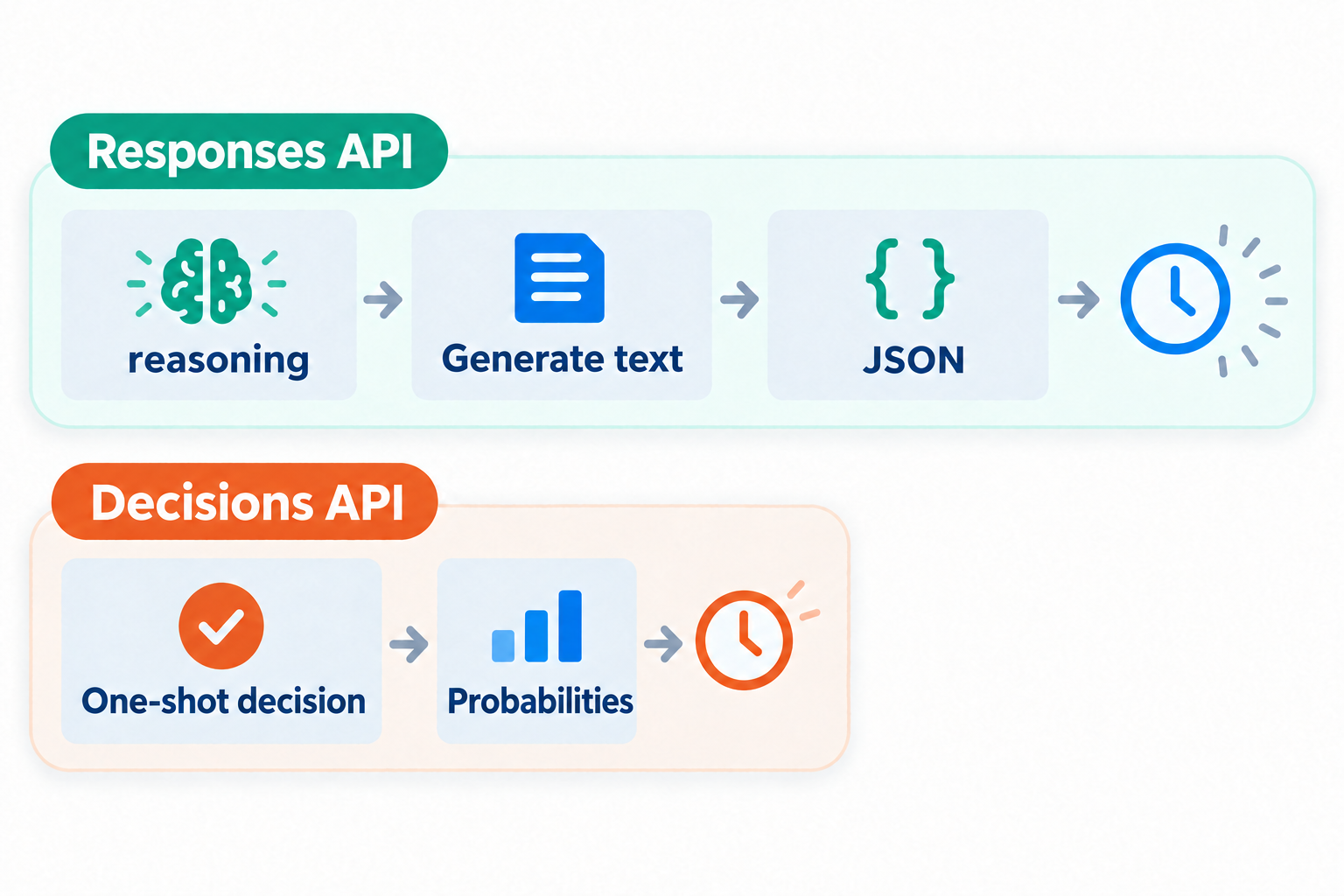
The Responses API does reasoning first, then generates text (JSON) token by token. Raising the reasoning effort makes it think more, but it also takes longer. The Decisions API returns per-candidate probabilities in a single decision, so its latency is shorter.
The other difference is the nature of the probabilities. If you ask the Responses API to "write your confidence from 0 to 1," you'll get a number, but it is a number the model wrote as text. The Decisions API returns a distribution over all candidates, so you can use it directly to set thresholds or pull out the Top-5. How far you can trust these probabilities is something I check later in the article.
Pricing
Pricing is also computed differently from the Responses API. Even with the same gpt-6-luna, the Decisions API only charges for input tokens.
| Billed item | Decisions API | Responses API (gpt-6-luna) |
|---|---|---|
| Input | $0.10 / 1M tokens | $0.10 / 1M tokens |
| Cache read | No extra charge | $0.01 / 1M tokens |
| Cache write | No extra charge | $0.125 / 1M tokens |
| Output | Not billed | $0.50 / 1M tokens |
The input price is the same, so if you only need a short JSON back, the difference from the Responses API is small. When the Responses API produces reasoning tokens or long outputs, it costs more. On the other hand, long questions or candidate descriptions increase input tokens for the Decisions API too, so it isn't always cheaper.
What tasks is it good for?
Now that we know how it works, let's think about what it is good for. The official guide lists classification, routing, and prioritization as examples. It also describes a voice-controlled app where the Live API handles the conversation and the Decisions API picks an action such as "go to the next slide" or "do nothing."
These have three things in common.
- The answer fits into a fixed set of candidates, true/false, or one of a few levels
- You want the answer quickly, every time
- You want to use how likely the answer is as a number in later processing
On the other hand, the official guide recommends Structured Outputs or function calling in the Responses API when you want to extract information into JSON with an arbitrary schema, have the model write explanations, or call tools with arguments.
Much of image recognition can be written in this "answer from a fixed set of candidates" form. But the contents vary a lot: telling 200 bird species apart by their feather patterns and deciding whether a person is riding a bicycle need very different abilities. The goal of the second half of this article is to find out which image recognition tasks the Decisions API can handle.
Usage, speed, and cost
Before that, let's look at how to call it and at the speed and cost measured in this experiment.
Usage
In the Python SDK, client.decisions.create(...) is available from 3.26.0. In my experiment code I sent requests with the SDK's generic client.post. Below is the part of the HICO task, which judges relations between people and objects, where 20 actions are asked as predicate questions in one request.
messages = [{
"role": "user",
"content": [
{"type": "input_text", "text": task},
{"type": "input_image",
"image_url": "data:image/png;base64," + b64,
"detail": "high"},
],
}]
questions = [
{
"type": "predicate",
"name": f"label_{k}",
"instructions": f"Does the image show {v}? Judge each interaction "
"independently. A person and object merely "
"co-occurring is insufficient.",
}
for k, v in classes.items() # e.g. "a person riding a bicycle"
]
result = client.post(
"/decisions",
cast_to=dict,
body={"model": "gpt-6-luna", "input": messages, "questions": questions},
)
scores = [a["probability"] for a in result["answers"]]
For the 200-species bird classification, I made a single choice question with the 200 species names as candidates.
questions = [{
"type": "choice",
"name": "species",
"instructions": task,
"choices": [{"value": k, "description": v} for k, v in classes.items()],
}]
Images are passed to input_image as base64 data URLs. A single request can include up to 128 images.
Speed
Here is the latency distribution per item across the five tasks.
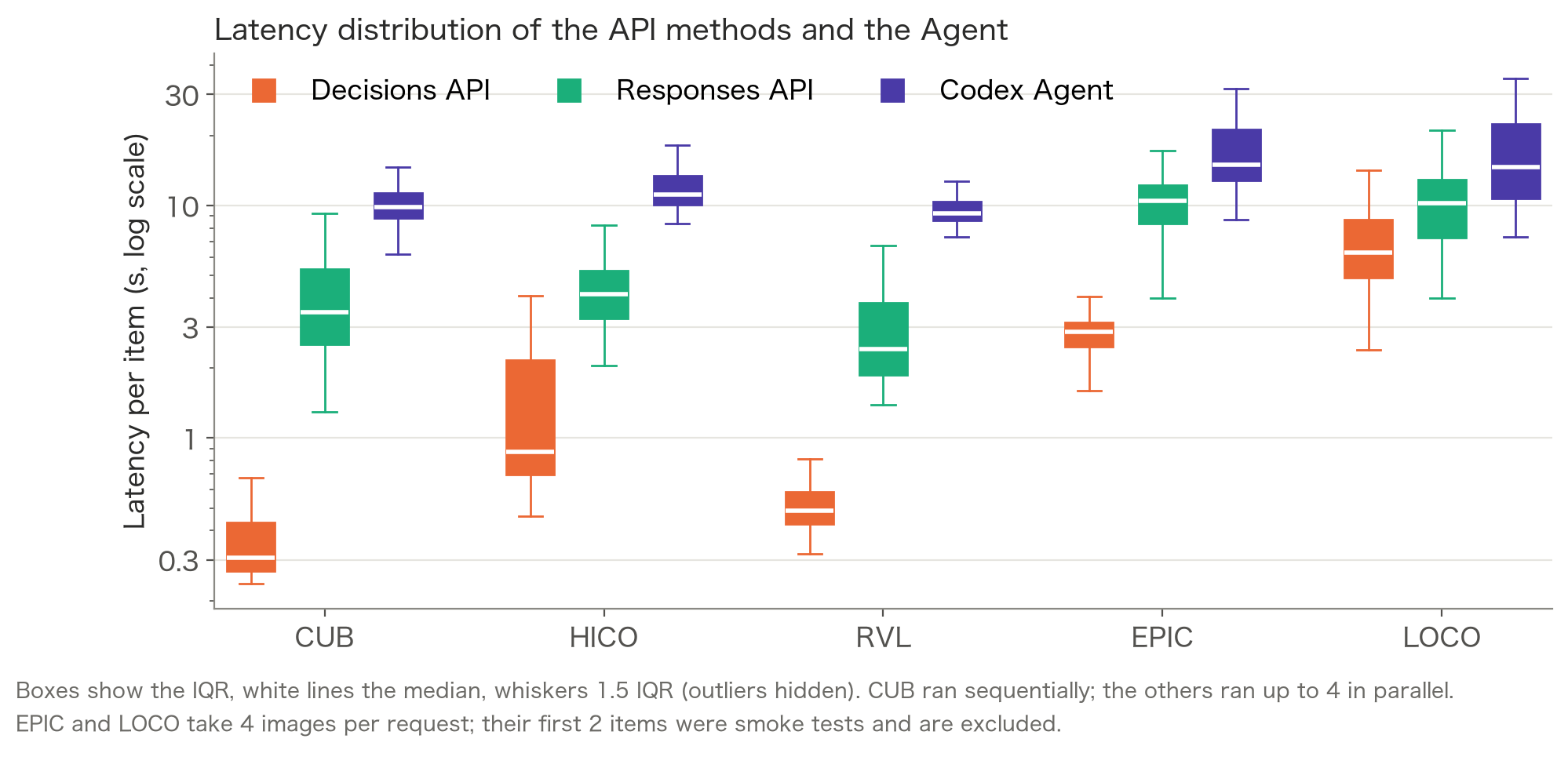
| Task | Input images | Decisions | Responses (medium) | Codex Agent | Responses / Decisions |
|---|---|---|---|---|---|
| CUB | 1 | 0.31 s | 3.47 s | 9.85 s | 11.4x |
| HICO | 1 | 0.87 s | 4.17 s | 11.12 s | 4.8x |
| RVL-CDIP | 1 | 0.49 s | 2.42 s | 9.27 s | 5.0x |
| EPIC | 4 | 2.85 s | 10.43 s | 14.94 s | 3.7x |
| MVTec LOCO | 4 | 6.29 s | 10.23 s | 14.66 s | 1.6x |
The numbers are medians. On single-image tasks, the Decisions API returned in 0.3 to 0.9 seconds, about 5 to 11 times faster than the Responses API. On EPIC and LOCO, which take four images, it took 3 to 6 seconds and the gap shrank. The reasoning effort for the Responses API was medium.
Cost
Next are the API cost per 1,000 items and the number of input tokens per request.
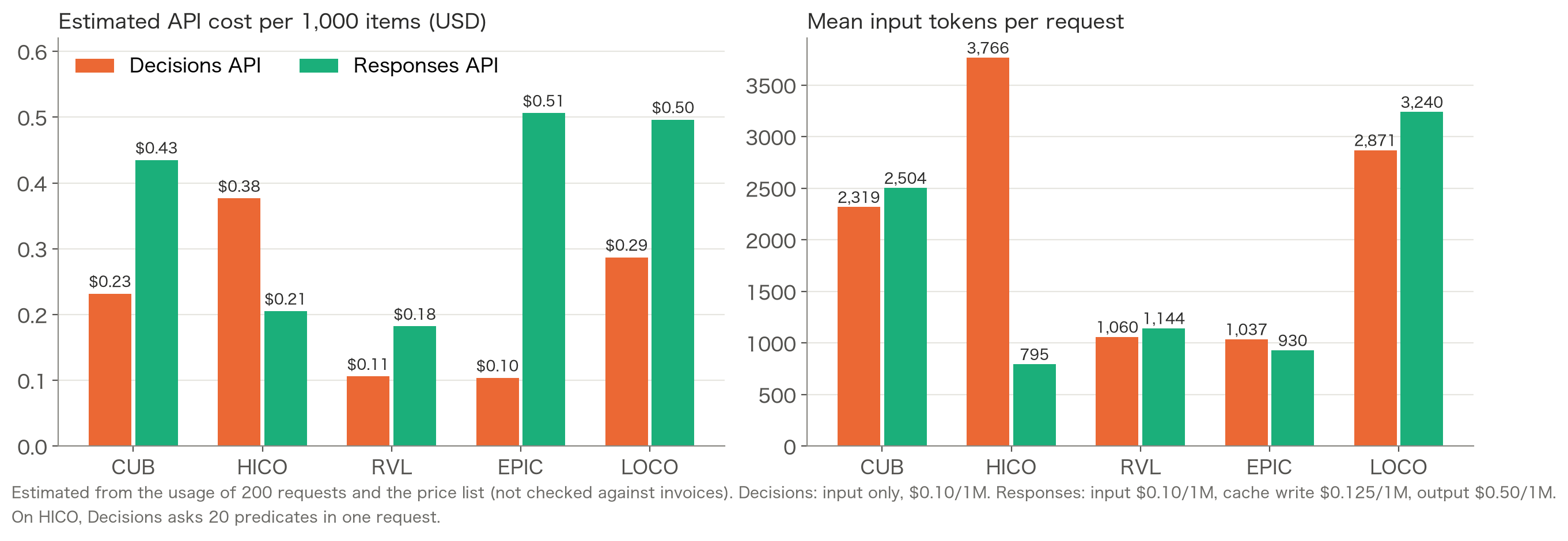
Costs are estimates computed from usage. Running 5 tasks x 200 items through both APIs came to about $0.59 in total.
Which API was cheaper flipped depending on the task.
- HICO: the Decisions API costs more
- All 20
instructionscount as input tokens - About 4.7x the input tokens of the Responses API
- All 20
- EPIC and LOCO: the Responses API costs about 1.7 to 4.9x more
- Reasoning tokens are billed as output
In short, the cost of the Decisions API is decided by how you design the questions, and the cost of the Responses API is decided by how much it reasons.
Comparing on image recognition tasks
Now for the main part. I looked at how well the Decisions API works for image recognition on five tasks.
The five tasks
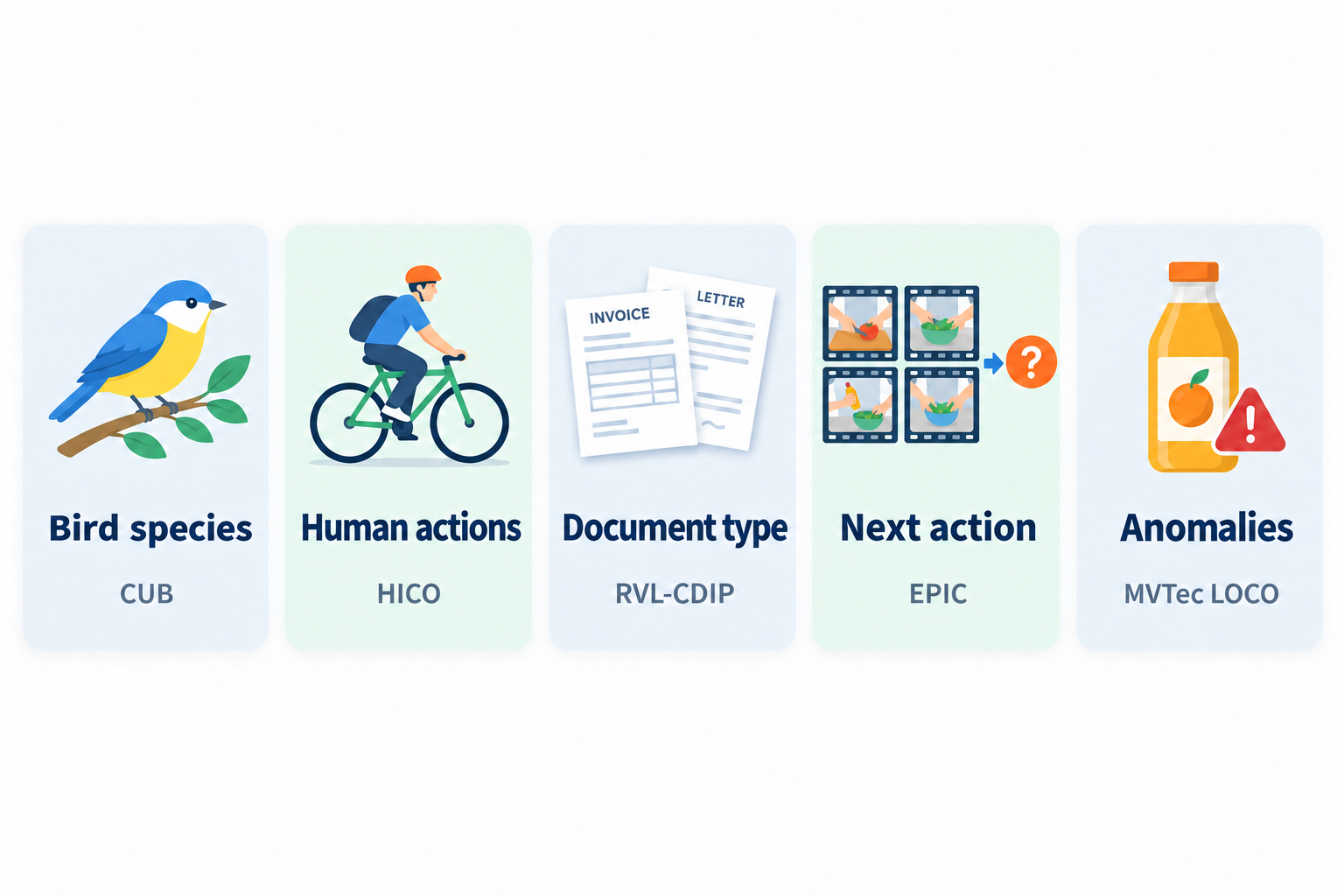
| Task | Kind | Problem | train / val / test | Metric |
|---|---|---|---|---|
| CUB-200-2011 | Image classification | Fine-grained classification of birds into 200 species | 2,000 / 1,000 / 200 | Top-1 accuracy |
| HICO | Multi-label classification | Judge 20 actions from relations between people and objects, as multiple labels | 389 / 195 / 200 | macro F1 |
| RVL-CDIP Mini | Image classification | Classify document images into 16 types | 160 / 80 / 200 | accuracy |
| EPIC-KITCHENS-100 | Action anticipation | Predict the next action out of 20 candidates from 4 past frames | 400 / 100 / 200 | Top-1 accuracy |
| MVTec LOCO AD | Anomaly detection | Using normal samples as reference, find structural anomalies such as scratches and logical anomalies in counts or layout | 300 normal / 100 normal / 200 | Mean per-category AUROC |
I picked them so that the required abilities would be as varied as possible. Each test set has 200 items, so I also look at 95% CIs.
The six methods
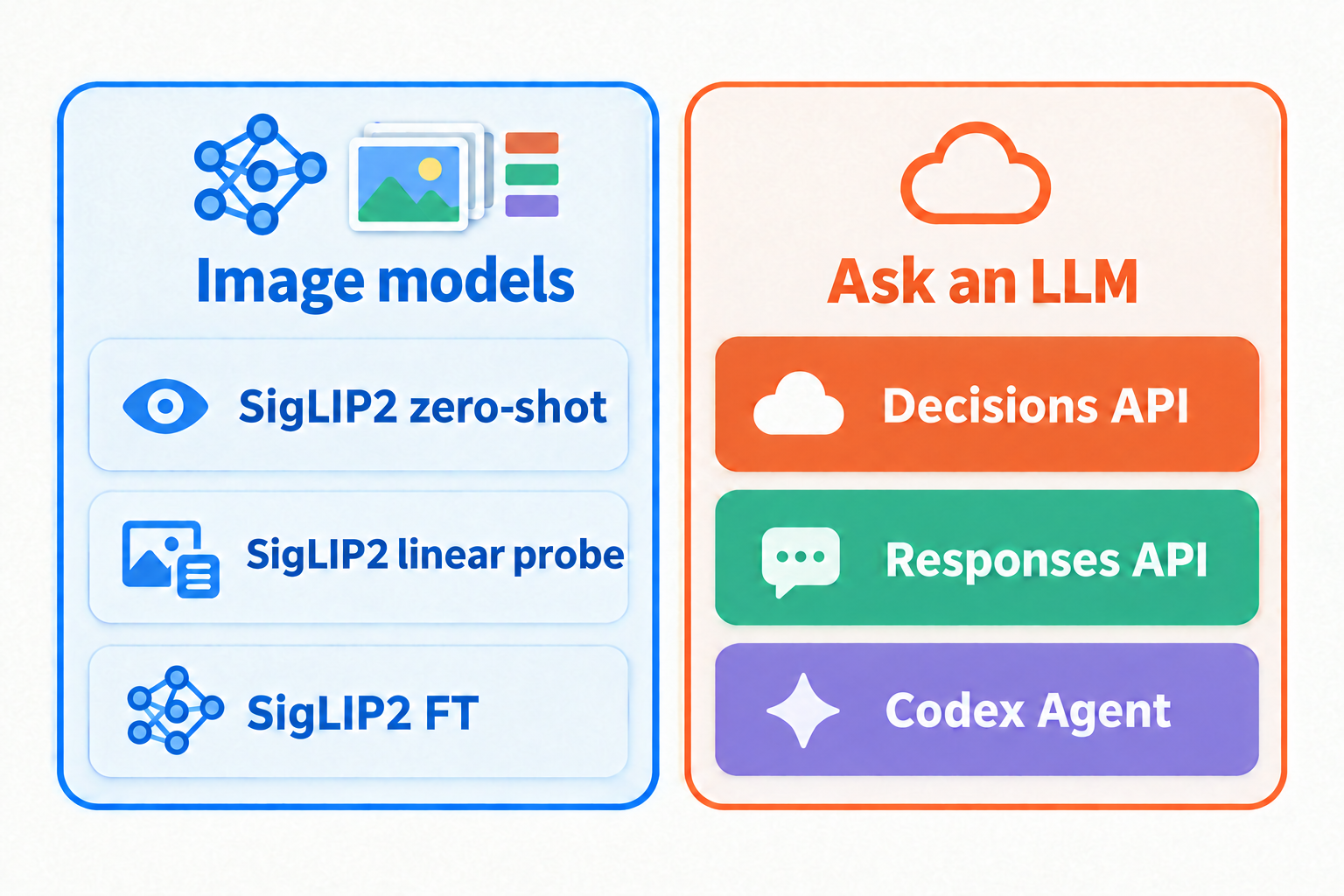
| Method | What it does |
|---|---|
| SigLIP2 zero-shot | Classifies by similarity between the image and text prompts for the candidates. Not trained on the task's labels |
| SigLIP2 linear probe | Freezes the image encoder and trains a linear classifier (logistic regression) on top of the embeddings |
| SigLIP2 FT | Trains the image encoder and the classification head for 3 epochs |
| Decisions API | Gets probabilities with choice or predicate |
| Responses API | Passes the image and candidates and gets the result with Structured Outputs (reasoning effort medium) |
| Codex Agent | Gives the image to codex exec and lets it decide while cropping and resizing (reasoning effort medium) |
The image model is google/siglip2-base-patch16-256, and the APIs and the Agent use gpt-6-luna. The APIs and the Agent get no training data, only the candidate names and the prompt. So the SigLIP2 linear probe and FT use labeled data, while zero-shot, the APIs, and the Agent don't.
Only for LOCO, anomalous images can't be used for training, so I replaced the linear probe with "kNN distance to normal samples" and FT with "a teacher-student model trained on normal images only." The APIs and the Agent get three normal samples plus the image to judge.
Overall results
Here are the results for 5 tasks x 6 methods.
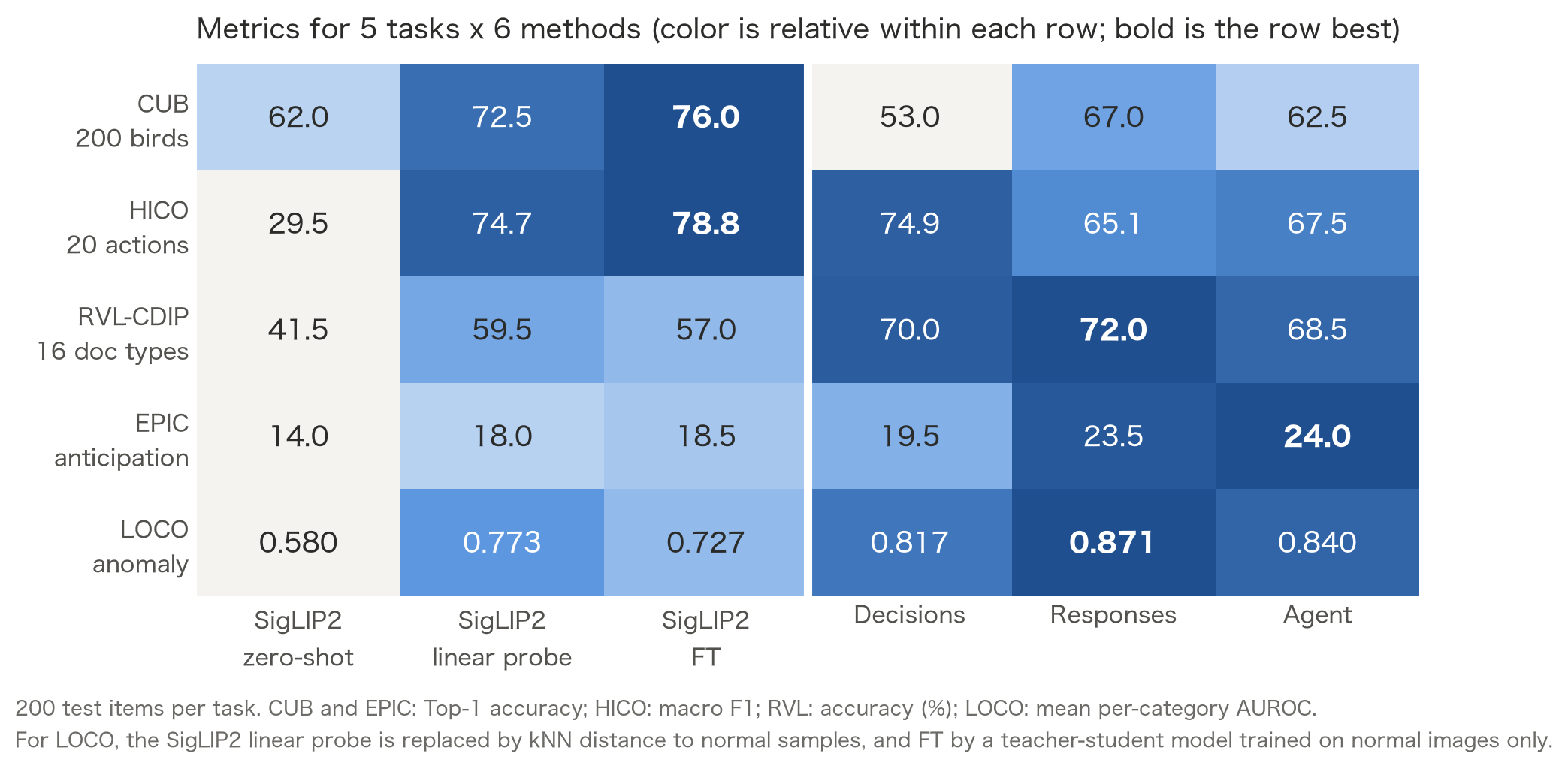
The best method differs from task to task. Trained SigLIP2 was best on CUB and HICO, the Responses API on RVL-CDIP and LOCO, and the Agent on EPIC. The Decisions API wasn't first on any task, but it was close to first on HICO and RVL-CDIP, and last on CUB.
With only 200 test items, though, the question is how much the differences in point estimates mean. Let's add 95% confidence intervals (CIs).
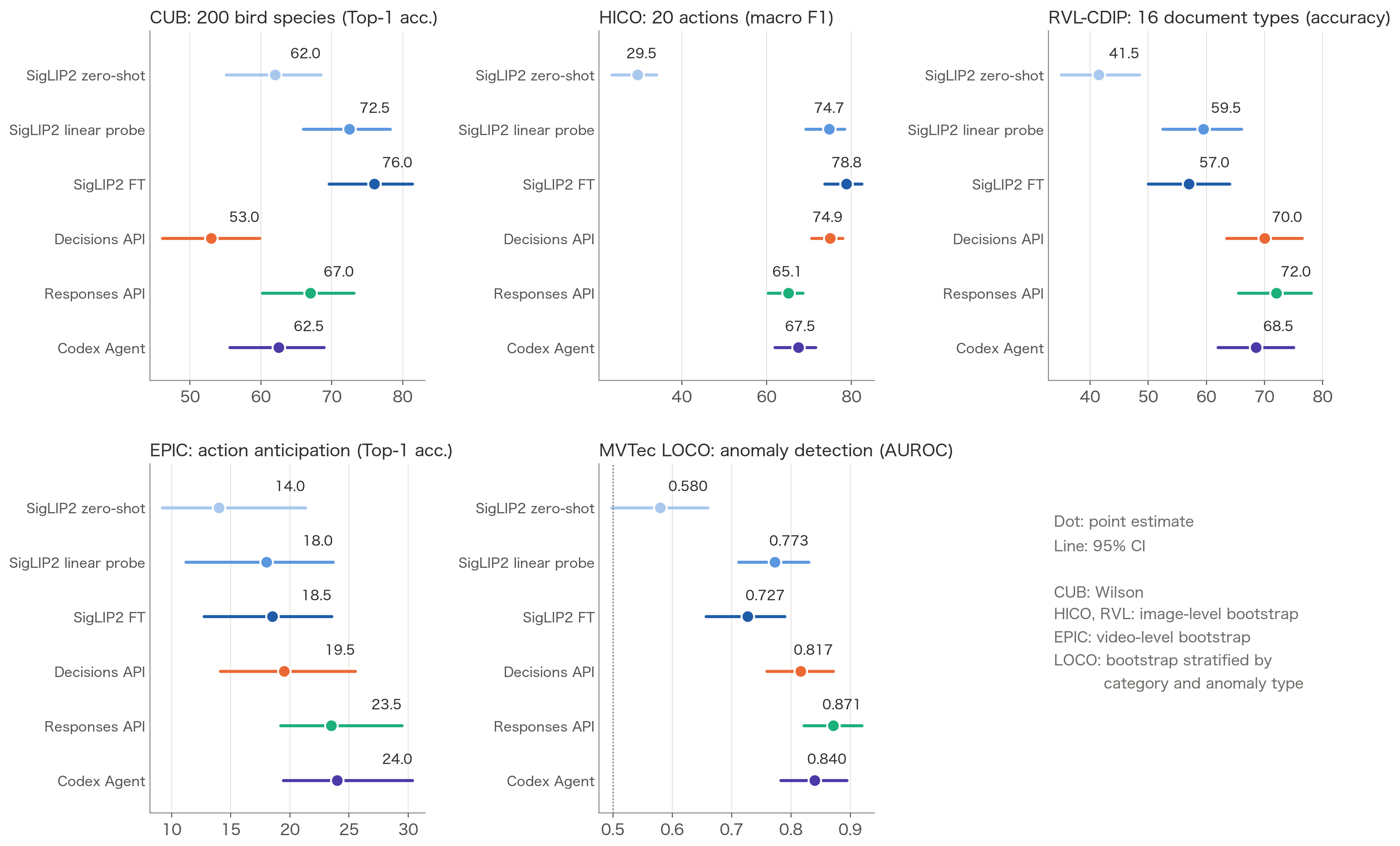
On EPIC the CIs overlap almost everywhere, so it's hard to say any method is better. On the other hand, the Decisions API on CUB and SigLIP2 zero-shot on HICO and LOCO clearly stand apart from the rest.
Below, I go through the tasks where the Decisions API was strong, where it was weak, and where it lost to the Responses API.
Where the Decisions API was strong: HICO and RVL-CDIP
On HICO, the Decisions API reached a macro F1 of 74.9%, 9.8 points above the Responses API's 65.1%, and close to the trained SigLIP2 FT (78.8%).
| Method | macro F1 | micro F1 | mAP |
|---|---|---|---|
| SigLIP2 zero-shot | 29.5% | 37.9% | 69.1% |
| SigLIP2 linear probe | 74.7% | 84.2% | 81.3% |
| SigLIP2 FT | 78.8% | 88.0% | 82.7% |
| Decisions API | 74.9% | 87.6% | 90.6% |
| Responses API | 65.1% | 83.5% | Not computed |
| Codex Agent | 67.5% | 84.2% | Not computed |
HICO asks for 20 actions to be judged independently, which maps directly onto 20 predicate questions. I had the Responses API write all 20 true/false values in one JSON, and its recall was low at 73.5% (84.7% for the Decisions API), with many missed actions. On mAP, which measures ranking by probability, the Decisions API was the highest at 90.6%.
On RVL-CDIP, the Responses API reached 72.0% and the Decisions API 70.0%, more than 10 points above SigLIP2 trained on 10 images per class (59.5%). The Decisions API matched the Responses API's accuracy at a fifth of the latency.
Where the Decisions API was weak: CUB
On CUB, the Decisions API scored 53.0%, the lowest of the six methods and 14 points below the Responses API's 67.0%. Many of the 200 species can only be told apart by feather patterns or beak shape. The Responses API can narrow down the candidates while putting features into words during reasoning, but the Decisions API has to produce probabilities for 200 candidates in a single decision. I think that is where the gap comes from.
Where the Responses API was strong: LOCO and EPIC
On LOCO, the Responses API had the highest AUROC at 0.871, and the Decisions API reached 0.817.
| Method | Overall | Logical anomalies | Structural anomalies |
|---|---|---|---|
| SigLIP2 zero-shot | 0.580 | 0.638 | 0.522 |
| SigLIP2 kNN (distance to normal samples) | 0.773 | 0.766 | 0.780 |
| SigLIP2 FT (teacher-student) | 0.727 | 0.707 | 0.747 |
| Decisions API | 0.817 | 0.766 | 0.868 |
| Responses API | 0.871 | 0.867 | 0.875 |
| Codex Agent | 0.840 | 0.795 | 0.884 |
On structural anomalies such as scratches and stains, the two APIs were about equally accurate. On logical anomalies, where the number or layout of parts is wrong, the Responses API was clearly ahead. To spot these, you need to look at the three normal samples, work out "what should be there, how many, and where," and compare that with the image being judged. The Responses API was better at problems like this, where you have to compare several images and think.
On EPIC, every method had a low Top-1 accuracy of 14 to 24%, and the 95% CIs overlapped heavily, so there was no clear difference between methods.
A side note: choose a better image model
So far I have used SigLIP2 as the shared image model, but switching to a model that fits the target easily raises accuracy, even when you only train a linear layer.
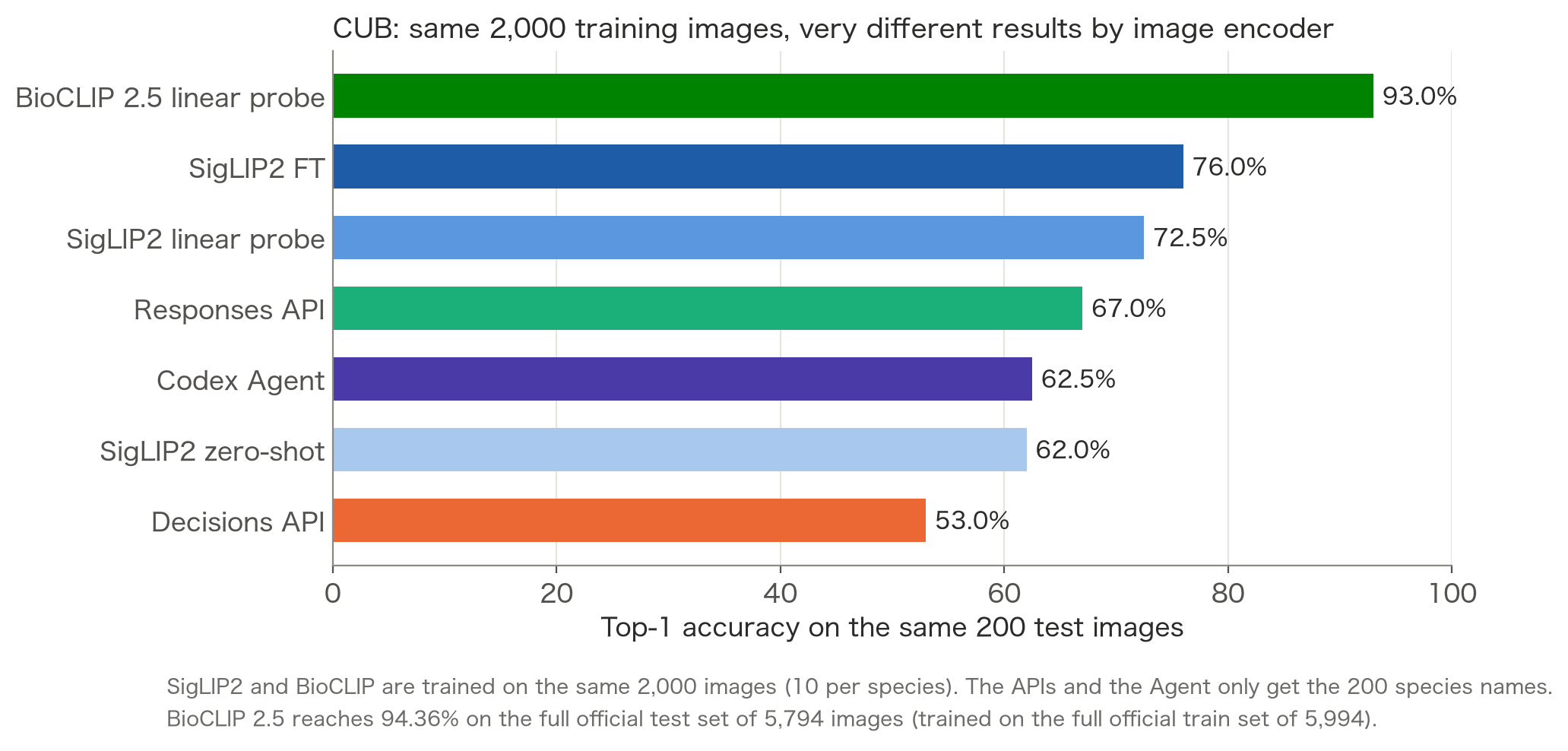
On CUB, training a linear probe on BioCLIP 2.5, which is pretrained on images of living things, with the same 2,000 training images gave 93.0% (SigLIP2 FT: 76.0%). Before choosing an API, look for a pretrained model that fits your target (yes, obviously).
Accuracy and latency
To see accuracy and latency together, I plotted latency on the x-axis and the metric on the y-axis.
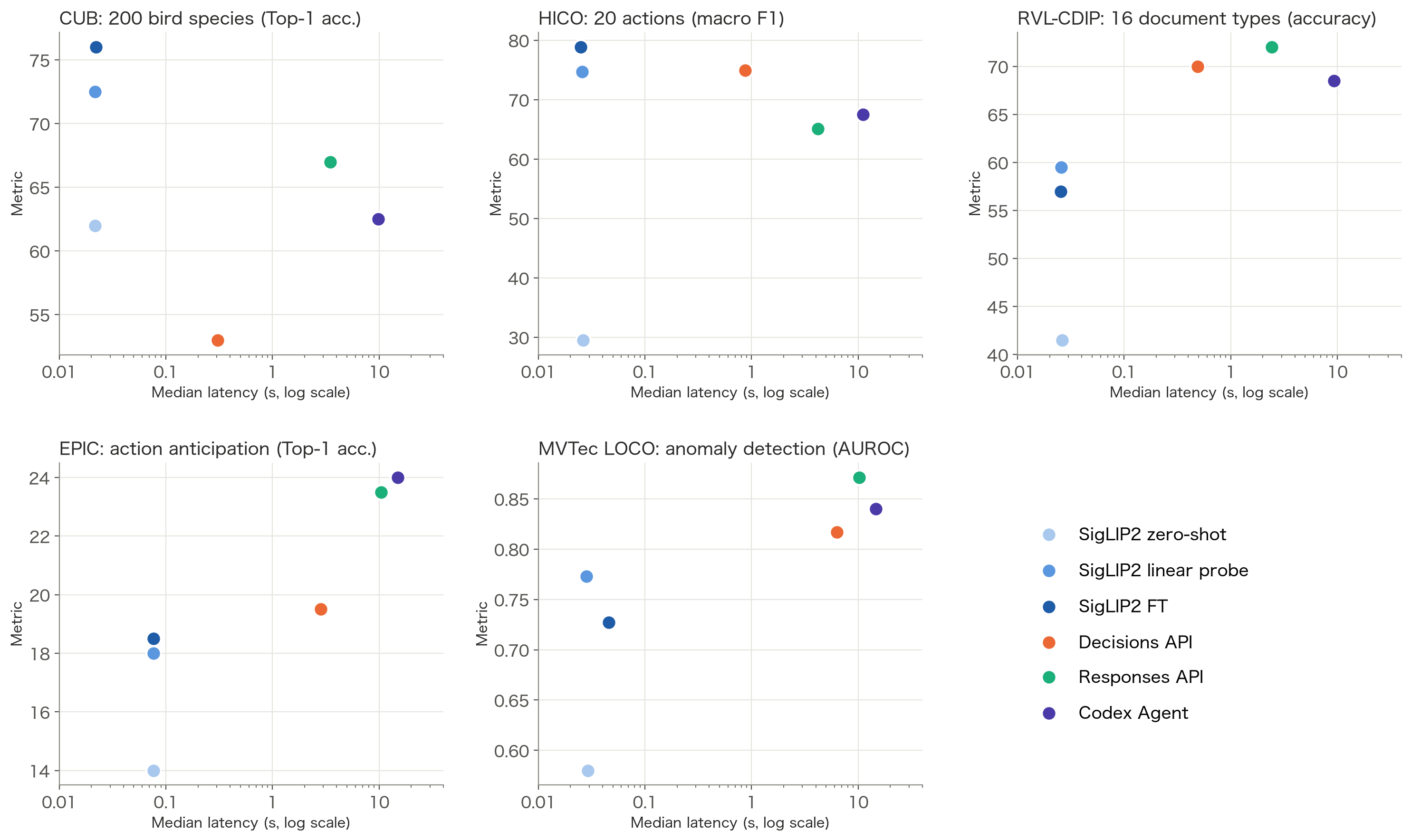
The closer to the top left, the faster and more accurate the method. On HICO and RVL-CDIP, the Decisions API is the furthest top-left among the APIs. Trained SigLIP2 runs locally in 20 to 80 ms per item, almost two orders of magnitude faster than the APIs.
The Agent took 10 to 15 seconds per item on every task, and there was no task where it clearly beat the Responses API. It rarely used cropping or resizing, and I saw no improvement worth the extra time.
How far can you trust the Decisions API's probabilities?
Finally, let's check how well the Decisions API's probabilities match actual accuracy (calibration). If 80% of the answers with probability 0.8 are correct, you can use that probability directly to set a threshold.
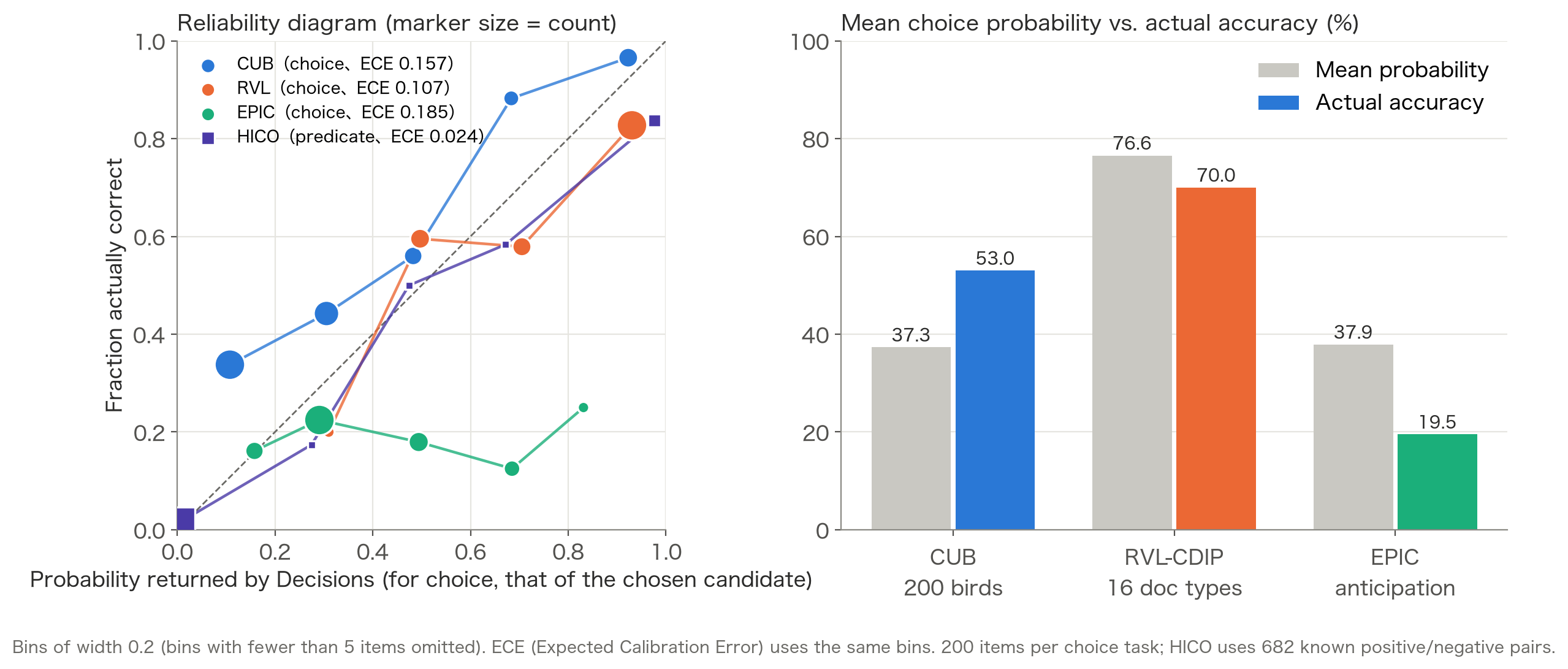
How far off they were depended on the task and the question type. ECE is the Expected Calibration Error; the closer to 0, the better the probabilities match accuracy.
predicate- HICO: almost on the diagonal, ECE 0.024
- LOCO: ranks well (AUROC 0.817), but ECE is 0.254
choice- CUB: probabilities come out low (mean 37.3%, accuracy 53.0%)
- EPIC: probabilities come out high (mean 37.9%, accuracy 19.5%)
- RVL-CDIP: fairly close (mean 76.6%, accuracy 70.0%)
The Decisions API's probabilities are easy to use for ranking, but whether you can treat their values as accuracy depends on the task. It is safer to check against labeled data before deciding on a threshold.
Choosing a method
Image recognition methods should be chosen not only by accuracy, but also by latency and cost requirements, whether you can prepare training data, and how hard the problem is. First, here are the numbers for the methods compared in this article.
| Training an image model (linear probe, FT) | Zero-shot (SigLIP2) | Decisions API | Responses API | Agent | |
|---|---|---|---|---|---|
| Latency (1 image) | 20 to 80 ms (local) | 20 to 80 ms (local) | 0.3 to 0.9 s | 2.4 to 4.2 s | 9 to 11 s |
| API cost per 1,000 items | None | None | $0.10 to 0.38 | $0.18 to 0.51 | $0.87 to 1.19 at API prices |
| Training data | Required | Not needed | Not needed | Not needed | Not needed |
| Good at | Problems with training data and a well-matched model | Coarse classes that can be told apart by name | Classification with a dozen or so candidates, judging several conditions at once | Distinguishing fine details, comparing several images | Problems where zooming in and re-checking the image helps |
| Bad at | Little training data and a poorly matched model | Fine-grained judgments like the five tasks here | Fine-grained classification with many candidates | Tight latency requirements | Tight latency or volume requirements |
Local methods have no API cost, but you still pay for GPUs and electricity. I ran the Agent on a ChatGPT plan this time, so its cost is the usage converted at API prices. Also, the Agent's "good at" row is an assumption; in this experiment it didn't clearly beat the Responses API on any task.
In practice, methods I didn't compare are also options. Placed by the amount of training data and latency, they look like this.
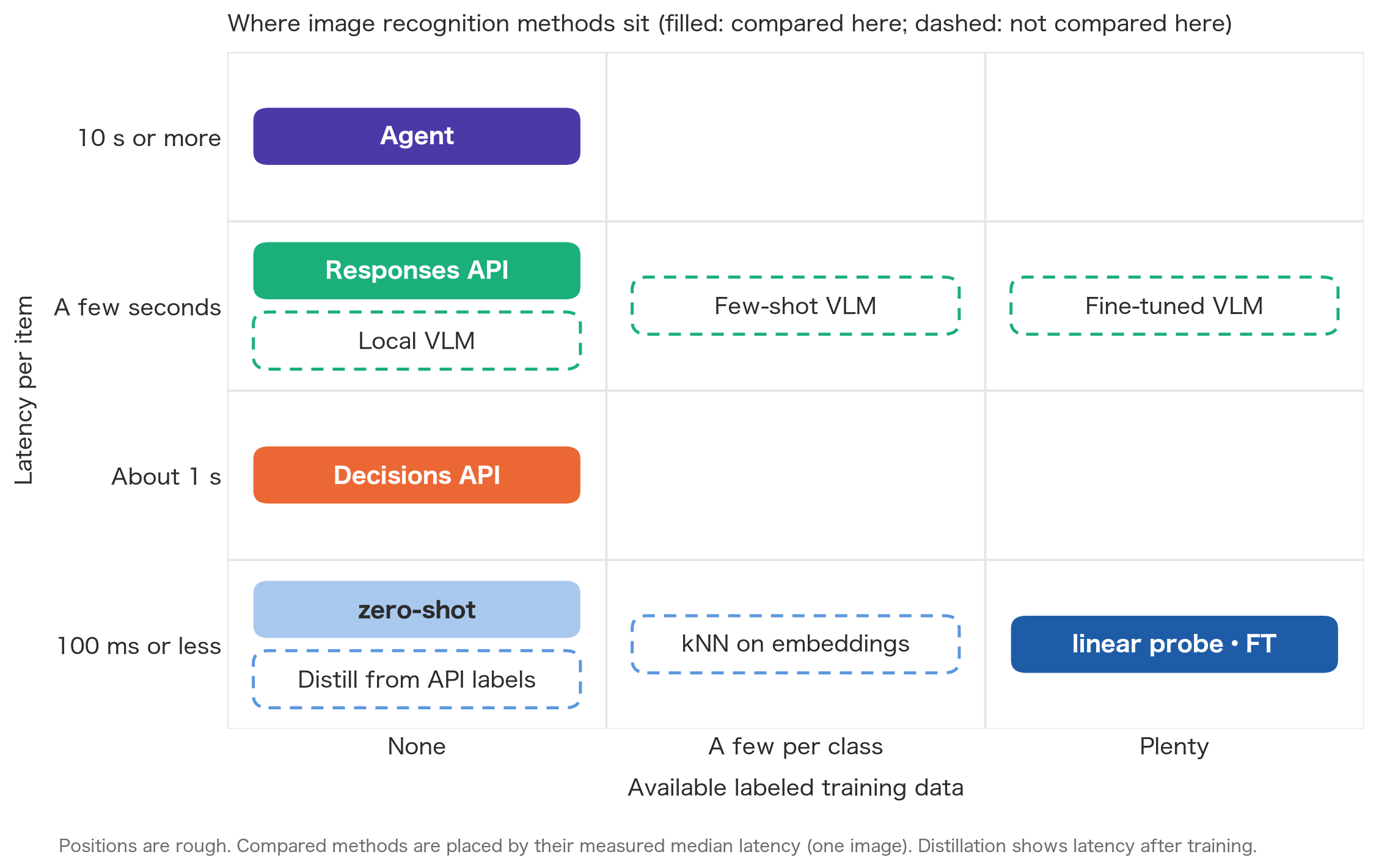
- When you have little training data
- kNN on embeddings: register a few images per class and classify; adding a class needs no training
- Few-shot VLM: pass reference images for each class to the Responses API or similar
- When the volume is high and API cost or latency doesn't fit
- Distillation: label data with the Decisions or Responses API and train an image model on those labels
- Cascade: let an image model decide first and send only low-probability items to the API
- When you can't send images to an external API
- Local VLM: run an open-weight VLM on your own GPUs
- When you have plenty of training data and want a more accurate VLM
- Fine-tuned VLM: train an open-weight VLM with LoRA or similar
In a cascade, the Decisions API's probabilities can serve as the threshold for deciding whether to call the API. But as we just saw, how far off the probabilities are depends on the task, so the threshold has to be set with labeled data.
Putting it together, the order of decisions looks like this.
- You have plenty of training data
- Train an image model (start with a linear probe, then FT if needed)
- You only have a few images per class
- Try kNN on embeddings or a few-shot VLM
- You have no training data
- If the volume is high, label with an API and distill, or build a cascade
- If you need answers in about a second, the Decisions API
- If you can wait a few seconds and need fine details or multi-image comparison, the Responses API
- If the volume is low and re-checking images or searching helps, the Agent
- You can't send images outside
- A local VLM, or train an image model
Training an image model has the lowest latency and cost, but as RVL-CDIP showed, it loses to the APIs when training data is scarce and the model doesn't fit the target. If you have no training data and aren't sure, the Decisions API is an easy baseline to start with.
How to improve each method
Every method here was compared with almost default settings, so each still has room to grow.
Training an image model
- Choose a pretrained model that fits the target
- Like BioCLIP 2.5 in the side note, this had the biggest effect in this experiment
- Add more training data (about 10 per class this time)
- Revisit the FT settings
- Only 3 epochs this time, so there is room for data augmentation and learning rate tuning
Decisions API
- Optimize the
instructionsand thedescriptionof eachchoice - Narrow down the candidates before asking
- When there are 200 candidates as in CUB, pass only an image model's Top-10 to
choice, or split into two stages, family then species
- When there are 200 candidates as in CUB, pass only an image model's Top-10 to
- Calibrate the probabilities
- Set thresholds with labeled data, or correct them with temperature scaling
- Pass reference images for each class along with the input (up to 128 per request)
Responses API
- Write it as a DSPy module and optimize the prompt with GEPA
- Raise the reasoning effort (
mediumthis time) - Narrow down the candidates with an image model first
- Pass reference images for each class as few-shot examples
Agent
- Give it task-specific knowledge with Agent Skills
- Give it a tool to search for reference images
- Let it call a trained image model as a tool, and leave checking the result to the Agent
Summary
- The Decisions API was strong at judging several conditions at once (HICO) and at document classification with little data (RVL-CDIP), and was 1.6 to 11 times faster than the Responses API, but it lost to the Responses API on 200-species fine-grained classification (CUB) and on anomaly detection that requires reading rules from normal samples (LOCO)
- If you have labeled data and an image model that fits the target, training an image model wins on both latency and accuracy; on CUB, a linear probe on BioCLIP 2.5 reached 93 to 94%
- The Decisions API's probabilities are easy to use for ranking, but calibration varies by task, so check them against labeled data before relying on them
Appendix
A. Experimental details
- The image model is
google/siglip2-base-patch16-256. Zero-shot uses similarity to text prompts, the linear probe is logistic regression on frozen embeddings, and FT trains the image encoder and classification head for 3 epochs - The APIs and the Agent use
gpt-6-luna. Reasoning effort for the Responses API and Codex Agent wasmedium; no equivalent setting was given to the Decisions API. Images were sent withdetail: high - For CUB the APIs ran sequentially; for the other tasks each method ran up to 4 requests in parallel. For EPIC and LOCO, the first 2 items were smoke tests and are excluded from latency. Local latency includes image loading, preprocessing, and inference, but not model startup or training
- For CUB, I used 10 images per species from the official train split for training, 5 for validation, and 1 per species from the official test split, 200 in total, as the test set. The APIs and the Agent only got the 200 species names, no bounding boxes or part annotations
- For HICO, I picked 4 actions each for bicycle, horse, cup, book, and chair, 20 labels in total. Of the 200 test images x 20 labels, only the 682 pairs with official positive/negative annotations (393 positive) are evaluated. This is not comparable with official scores on all 600 HICO labels
- For RVL-CDIP, I used 10 images per class for train, 5 for val, and 12 to 13 for test from the public Mini version. OCR results included in the mirror were not given to the models
- For EPIC, I used 4 frames at 7.1, 5.1, 3.1, and 1.1 seconds before the target action starts, and split so that no video is shared between train, val, and test. Of the 20 candidates, 14 appear as correct answers in the test set
- For LOCO, the 200-image test set over 5 categories consists of 100 normal, 50 logical anomaly, and 50 structural anomaly images. Anomalous images were used neither for training nor for threshold tuning. The APIs and the Agent got 3 normal samples, while the two SigLIP2 methods used 60 normal samples per category, so the amount of information differs between methods
- Codex Agent ran in a per-case OS sandbox, and I confirmed that it could be denied reading the directory with the ground-truth labels, rewriting the inputs, and making external network connections from commands
B. What this experiment can't tell you
- This is a small comparison with 200 items per task. It doesn't establish which method is better on the full datasets or in general
- The APIs and the Agent use no labeled data, while the training-based methods do. Internal image processing also differs between methods
- Except for BioCLIP 2.5 in the side note, the image model is the shared SigLIP2, not a dedicated model well tuned for each task. FT is also a small trial with only 3 epochs
- Overlap between pretraining data and test images was not checked for any method
- Costs are estimates from
usageand the price list, not checked against invoices
C. Making the Decisions API talk one hiragana character at a time
This one is just for fun. Since a choice can have up to 255 candidates, I wondered whether making every hiragana character a candidate would let it hold a conversation by next character prediction instead of next token prediction, so I built it. Of course, this is not what the Decisions API is meant for.

The mechanism is simple.
- The candidates are 80 hiragana characters, the Japanese comma and period, and
<END>, 83 in total - Put the conversation history and the reply so far into
input, and havechoicepick the next character - Append the chosen character to the reply and ask again (stop at
<END>or at 50 characters) - Each candidate's
descriptioncontains the reply with that character appended
choices: VALUES.map(value => ({ value, description: value === END
? `現在の返答 ${JSON.stringify(prefix)} を完成した回答として終了します。`
: `次の一文字として「${value}」を追加します。追加後の返答は ${JSON.stringify(prefix + value)} です。` }))
The median latency per character is about 250 ms, so the characters come out at about human typing speed. But every request sends the whole conversation and the descriptions of all 83 candidates, which costs about 3,000 tokens per character.
As for the conversation, see the screenshot above. To "Hello, nice to see you again today" it replied "あとでね" ("later"), and when I introduced myself it said "あとでね" again. On the other hand, when I asked whether it remembered my name, it correctly answered "なつき" (Natsuki).

To "Greet me briefly" it replied "ちわ。" ("hey."), and to "Keep writing あ for 50 characters" it obediently kept lining up "あ".
Putting 86 example conversations and every per-character choice in them (1,560 steps) into the context as many-shot examples raised the score on predicting the next character of a half-written reply from 5 to 7 out of 8. Even so, when starting a conversation from an empty reply, it often collapsed into repeating the same character, like "おこごごごご...". Once it picks a strange character, the reply containing it becomes the next input, and I think it can't recover from there.
References
- OpenAI Decisions API
- Other OpenAI docs
- Prompt optimization
- Image models
- Datasets