Comparing 5 models on structured extraction from printed business documents
by 逆瀬川ちゃん
9 min read
Hi there! This is Sakasegawa-chan (@gyakuse)!
In my previous article I compared 19 models on Japanese handwritten note OCR. As a follow-up, this time I'd like to compare 5 models on extracting structured data from printed business documents (invoices, receipts, and business cards).
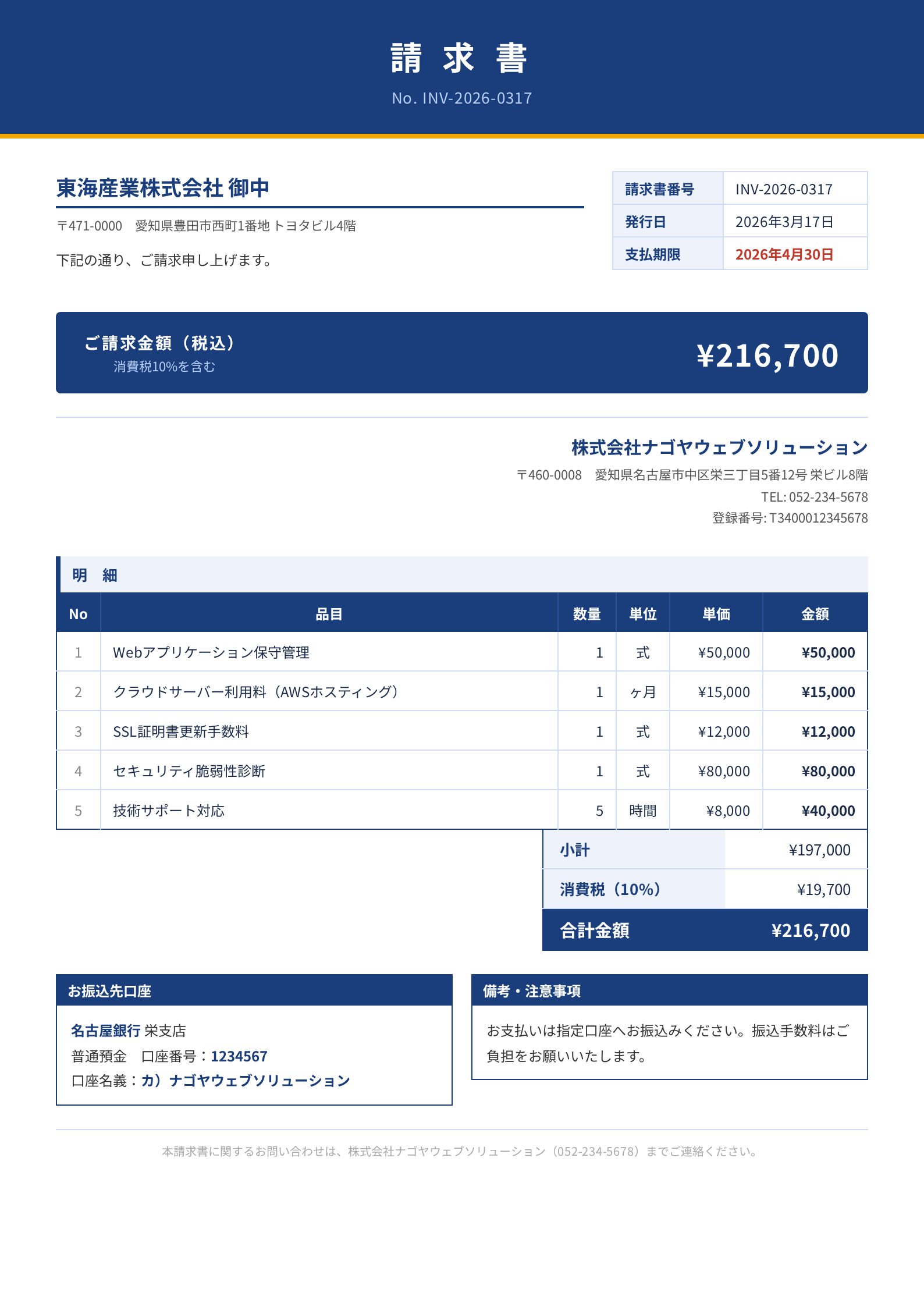
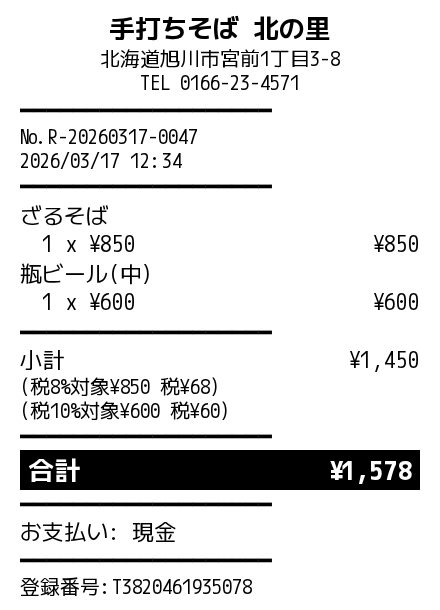
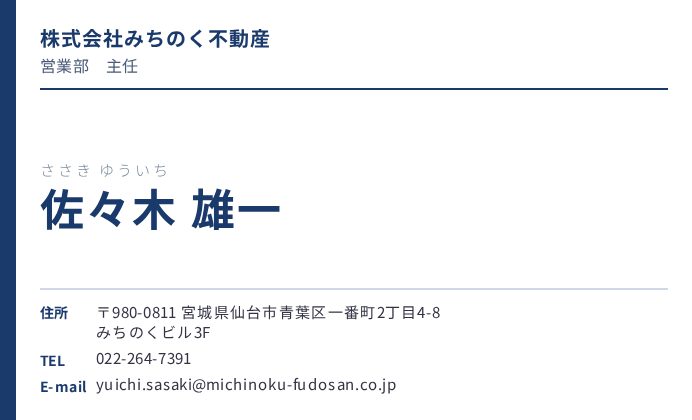
I generated 30 synthetic documents like the ones below and asked each model to extract structured data conforming to a JSON Schema, then measured accuracy.
How this differs from last time
Last time I measured character recognition accuracy: "can the model read handwriting?". This time I'm measuring "can the model put the right values into the right fields, given a printed document?".
Concretely, I hand the model an image of an invoice and ask: "Who is the vendor_name (issuer)? What is the total_amount? How are the line_items structured?" The model has to return structured data following a JSON Schema.
This isn't pure OCR. It's a 3-step task: read the characters → understand the document structure → assign values to schema fields. I leveraged each provider's structured output API to evaluate this.
| Provider | Structured output method |
|---|---|
| Claude | tool_use |
| Gemini | response_schema |
| OpenAI | json_schema (strict) |
Claude also supports json_schema mode, but it has a limit of 16 nullable (union-typed) parameters. The invoice schema has 20 nullable fields, which exceeds that limit, so I'm using tool_use instead.
How the synthetic dataset is built
Automating data generation with an Agent Skill
I didn't build the evaluation dataset by hand. It's auto-generated by a generate-business-doc skill I implemented as a Claude Code Agent Skill. Just typing /generate-business-doc invoice 10 produces a complete set of data (JSON + HTML + PNG) for 10 invoices.
The skill is structured as an Orchestration: it launches two subagents in sequence.
/generate-business-doc invoice 10
│
├─ Step 1: Check manifest
│ └─ Look at existing data coverage and identify uncovered combinations
│
├─ Step 2: content-generator subagent
│ └─ Generate JSON Schema + 10 ground truth JSON files
│
├─ Step 3: renderer subagent
│ └─ Generate unique HTML/CSS from each JSON → screenshot via Playwright
│
└─ Step 4: Update manifest
content-generator: realistic Japanese business data
The content-generator subagent produces realistic Japanese business data spread across industries, regions, and sizes. It looks at the manifest's coverage and makes calls like "we have a lot of IT industry, so let's prioritize medical and construction next."
The data has these axes of diversity.
| Axis | Variations |
|---|---|
| Industry | IT, manufacturing, F&B, construction, retail, medical, real estate, education |
| Region | Hokkaido, Tohoku, Kanto, Chubu, Kinki, Chugoku, Shikoku, Kyushu |
| Size | small (1-2 lines, <¥10,000), medium (3-5 lines), large (6+ lines, >¥500,000) |
Numerical consistency (subtotal + tax = total) is also part of the generation rules, and that becomes the ground truth as is.
renderer: HTML generation without templates
This is the most fun part. The renderer subagent doesn't use fixed templates. The LLM generates fresh HTML/CSS every time. So even for the same "invoice", you get a monochrome minimalist design one time, a navy-blue header with a striped line-item table the next time, and so on. Every output looks different.
I put a lot of care into the receipts in particular — they faithfully reproduce the look of POS thermal printer output. The skill instructions are pretty detailed.
- Color is black text on white only (no color accents)
- Font is M PLUS 1 Code (monospace) to mimic thermal print
- Separator lines are not CSS borders — they're repeated text characters like
━━━━━━ <table>elements are forbidden. Use flexbox or text-align for layout- Total emphasis is via inverted display (black background + white text), large font, or bold + letter-spacing
Paper widths are 58mm (220px) and 80mm (300px). Separator characters span 5 variations: ━, ─, =, *, -. Line-item display has 3 patterns: 1-line, 2-line, and quantity inline. All mixed.
For Playwright screenshots I use device_scale_factor=2. Invoices capture as A4 (794x1123), business cards as 91mm x 55mm (346x210), and receipts use full_page.
This kind of "auto-generate diverse-layout synthetic data" task plays directly into Agent Skill's strengths. Template-based approaches hit a diversity ceiling, but if you ask an LLM to "make a different layout each time," you really do get something different every time.
The 5 models compared
| Model | Provider | Structured output method |
|---|---|---|
| claude-4.6-opus | Anthropic | tool_use |
| claude-4.5-sonnet | Anthropic | tool_use |
| gemini-3.1-pro-preview | response_schema | |
| gemini-3-flash-preview | response_schema | |
| gpt-5.4 | OpenAI | json_schema (strict) |
The previous article compared 19 models including 11 OSS models, but this time it's API models only. Structured output (output that conforms to a JSON Schema) requires API-side schema enforcement, so OSS models without tool_use or response_schema are out of scope.
Evaluation methodology
Field-level accuracy
Evaluation is per-field. For each field, I compare the prediction against ground truth and assign a score from 0.0 to 1.0.
- String fields: NFKC normalized + whitespace stripped, then compared via Normalized Levenshtein Similarity
- Numeric fields: 1.0 if exact match, deducted based on diff
- Date fields: normalize Japanese era / slash notations, then exact-match
- Array fields (line_items): optimal matching via Hungarian algorithm, then per-element comparison
The mean of all field scores is the document's accuracy.
parse / schema success rate
Since I'm using structured output APIs, parse basically succeeds 100% of the time (the JSON is always valid). Schema compliance verifies presence of required fields and the structure of nested objects.
Results
Evaluation results across 30 printed business documents.
| Rank | Model | Accuracy | Parse | Schema | Avg Time |
|---|---|---|---|---|---|
| 1 | claude-4.6-opus | 0.9931 | 100% | 100% | 10.4s |
| 2 | gemini-3-flash-preview | 0.9925 | 100% | 100% | 9.9s |
| 3 | gemini-3.1-pro-preview | 0.9909 | 100% | 100% | 19.4s |
| 4 | gpt-5.4 | 0.9900 | 100% | 100% | 6.9s |
| 5 | claude-4.5-sonnet | 0.9733 | 100% | 100% | 10.0s |
All models hit 100% parse/schema, and the top 4 are within 0.3% of each other. In the previous handwriting OCR test, Gemini 3.1 Pro topped the chart at 0.924 with GPT-5.4 down at 10th with 0.714 — a huge gap. For printed-document structured extraction, they're basically tied. Reading printed text is taken for granted; the differentiator is structural understanding and field assignment accuracy.
Per-document-type accuracy
| Model | Invoice | Receipt | Business card |
|---|---|---|---|
| claude-4.6-opus | 0.9886 | 0.9906 | 1.0000 |
| gemini-3-flash-preview | 0.9888 | 0.9887 | 1.0000 |
| gemini-3.1-pro-preview | 0.9901 | 0.9825 | 1.0000 |
| gpt-5.4 | 0.9884 | 0.9874 | 0.9941 |
| claude-4.5-sonnet | 0.9605 | 0.9601 | 0.9991 |
Both Claude Opus and the Gemini models scored a perfect 1.0 on business cards. Cards have few fields and a fairly fixed layout, so it's an easy task for the top models.
Invoices and receipts get harder as line-item count grows. Receipts in particular use monospace text layout — readable for humans, but slightly different from a typical table layout, so OCR models tend to lose a bit of accuracy.
Hard fields
Looking at the fields with low accuracy across all models, a pattern emerges.
| Field | All-model average accuracy | Cause |
|---|---|---|
| line_items | 0.888 | Array matching is strict. Item-name notation variation hurts |
| vendor_address | 0.898 | Address notation variation (「三丁目」↔「3-」, with/without postal code) |
| client_address | 0.909 | Same as above |
| bank_account_holder | 0.977 | Katakana account name variation |
The address notation variation is partially an evaluation-logic issue. "愛知県名古屋市中区栄三丁目5番12号" and "愛知県名古屋市中区栄3-5-12" mean the same thing semantically, but Levenshtein-based string comparison gives them about 0.78. All models share the same conditions, so this doesn't affect inter-model comparison, but the absolute accuracy values look slightly low.
line_items is the lowest because of the strictness of array comparison. When matching items via the Hungarian algorithm, subtle differences in item names — like full-width vs half-width parentheses in "クラウドサーバー利用料(AWSホスティング)" — start to matter.
Handwriting vs printed: rankings shuffle
When I line this up next to the previous handwriting OCR results, an interesting pattern emerges.
| Model | Handwriting OCR (NLS) | Printed structured (Accuracy) |
|---|---|---|
| claude-4.6-opus | 0.897 (4th) | 0.9931 (1st) |
| gemini-3-flash-preview | 0.918 (2nd) | 0.9925 (2nd) |
| gemini-3.1-pro-preview | 0.924 (1st) | 0.9909 (3rd) |
| gpt-5.4 | 0.714 (10th) | 0.9900 (4th) |
| claude-4.5-sonnet | 0.640 (12th) | 0.9733 (5th) |
GPT-5.4 improved dramatically. It struggled at 10th out of 19 on handwriting OCR, but on printed structured extraction it's 4th, within 0.3% of the top model. So GPT-5.4 is bad at "reading" handwriting but good at "reading and structuring" printed text.
Conversely, Gemini 3.1 Pro was 1st on handwriting OCR, but drops to 3rd on printed structured. The gap is only 0.2% so it's basically noise, but Gemini Flash coming out on top is a bit surprising.
Claude 4.5 Sonnet is last on both tasks, but printed structured (0.9733) is dramatically higher than handwriting OCR (0.640). This shows the generational pattern of "can read print, weak on handwriting."
Speed
GPT-5.4's 6.9s average is fastest. On the previous handwriting OCR it was 123.4s — overwhelmingly slow — but for structured extraction tasks, reasoning time appears to be much shorter. Gemini Flash is also fast at 9.9s. Gemini Pro is on the slower side at 19.4s.
Summary
- Printed business document structured extraction is a tight race in the top 4 models, all within 0.3%. Any of them gives sufficient accuracy
- GPT-5.4, which sat at 10th on handwriting OCR, jumped to 4th on printed structured extraction. Tasks really do have model-specific strengths and weaknesses
- The evaluation code and dataset are published at ocr-comparison under
structured_eval/
Appendix: per-image extraction examples
Let me show actual document images alongside each model's extraction results.
Invoice: invoice_004 (monochrome, compact)
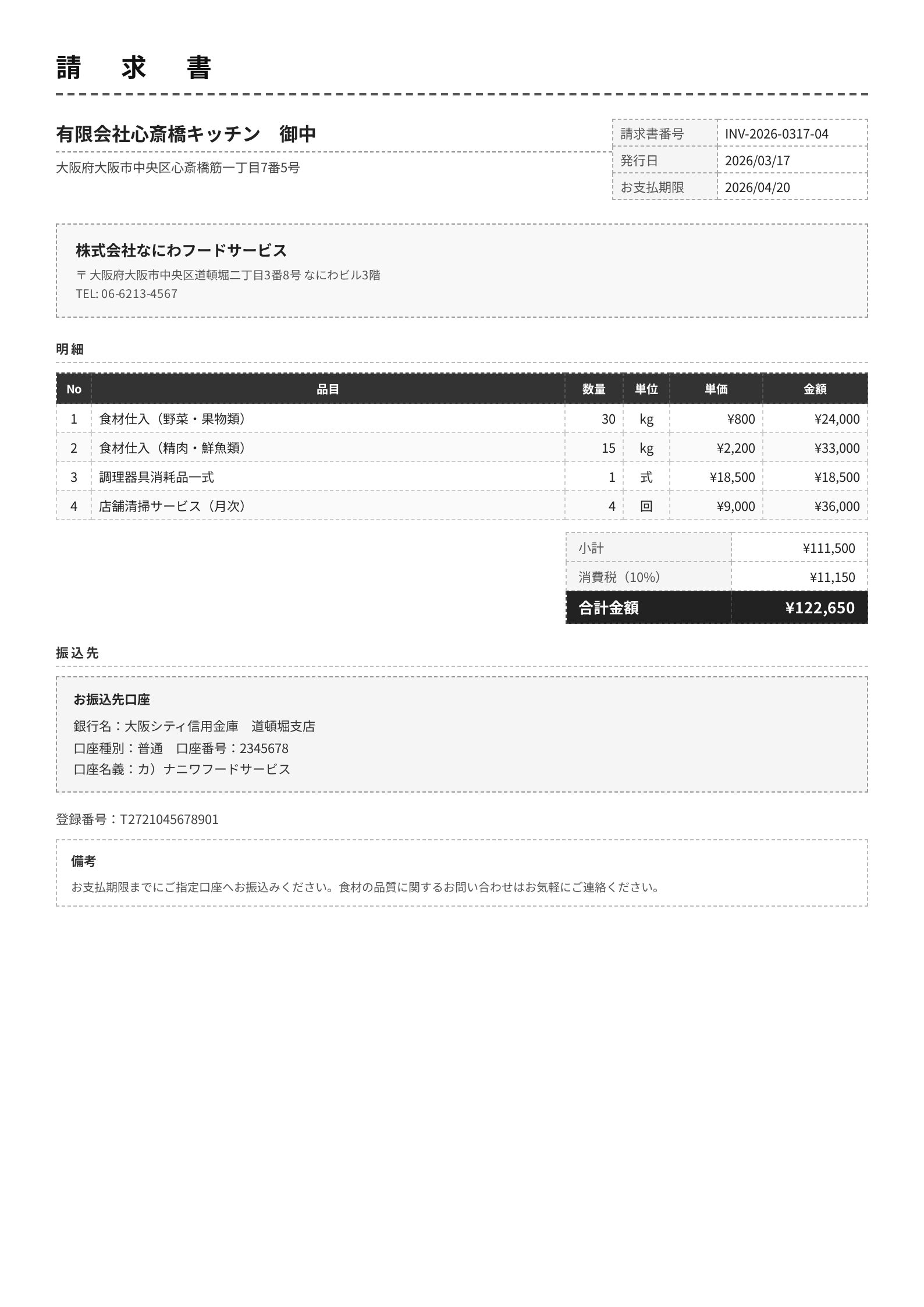
A monochrome, compact F&B-industry invoice with 4 line items. Claude 4.6 Opus, both Gemini models, and GPT-5.4 extract it almost perfectly. Here are just the fields where they diverged.
| Field | Ground truth | claude-4.6-opus | claude-4.5-sonnet | gemini-3.1-pro | gemini-3-flash | gpt-5.4 |
|---|---|---|---|---|---|---|
| vendor_name | 株式会社なにわフードサービス | OK | NG: 有限会社心斎橋キッチン 御中 | OK | OK | OK |
| client_name | 有限会社心斎橋キッチン | OK | NG: 株式会社なにわフードサービス | OK | OK | OK |
| vendor_phone | 06-6213-4567 | OK | NG: null | OK | OK | OK |
| vendor_address | ...道頓堀二丁目3番8号... | OK | NG: ...心斎橋筋一丁目7番5号 | OK (with 〒) | OK | OK |
| bank_account_holder | カ)ナニワフードサービス | OK | OK | OK | OK | カ) ナニワフードサービス |
Claude 4.5 Sonnet swapped the vendor (issuer) and client (recipient). Looking at the image, "有限会社心斎橋キッチン 御中" is displayed prominently at the top, and Sonnet apparently mistook it for the issuer. Japanese invoices put the recipient's name in a visually prominent position, so a model with shallow document-structure understanding can mix them up.
The other 4 models extracted every field correctly. GPT-5.4 has a stray space in the account holder name, but it's a harmless, minor difference.
Claude 4.6 Opus's full output looks like this.
{
"vendor_name": "株式会社なにわフードサービス",
"client_name": "有限会社心斎橋キッチン",
"invoice_number": "INV-2026-0317-04",
"issue_date": "2026-03-17",
"due_date": "2026-04-20",
"line_items": [
{"description": "食材仕入(野菜・果物類)", "quantity": 30, "unit": "kg", "unit_price": 800, "amount": 24000},
{"description": "食材仕入(精肉・鮮魚類)", "quantity": 15, "unit": "kg", "unit_price": 2200, "amount": 33000},
{"description": "調理器具消耗品一式", "quantity": 1, "unit": "式", "unit_price": 18500, "amount": 18500},
{"description": "店舗清掃サービス(月次)", "quantity": 4, "unit": "回", "unit_price": 9000, "amount": 36000}
],
"subtotal": 111500, "tax_rate": 0.1, "tax_amount": 11150, "total_amount": 122650,
"bank_name": "大阪シティ信用金庫", "bank_branch": "道頓堀支店",
"bank_account_type": "普通", "bank_account_number": "2345678",
"bank_account_holder": "カ)ナニワフードサービス"
}
Receipt: receipt_008 (58mm wide, F&B)
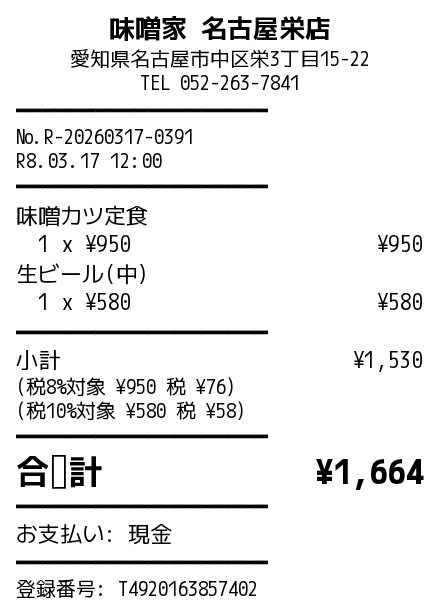
A 58mm-wide thermal-print-style receipt. Separator lines use ━, and the total is emphasized with a large font. The date on this receipt is shown as R8.03.17 (Reiwa year 8) format.
| Field | Ground truth | claude-4.6-opus | claude-4.5-sonnet | gemini-3.1-pro | gemini-3-flash | gpt-5.4 |
|---|---|---|---|---|---|---|
| store_name | 味噌家 名古屋栄店 | OK | NG: 味噌蔵 | OK | OK | OK |
| issue_date | 2026-03-17 | OK | NG: 2028-03-17 | OK | OK | OK |
| Other fields | OK | OK | OK | OK | OK |
Claude 4.5 Sonnet has 2 mistakes. Misreading "味噌家" as "味噌蔵" is an OCR accuracy problem. The other one, issue_date: 2028-03-17, is a Japanese-era conversion mistake. "R8.03.17" on the receipt means Reiwa year 8 = 2026, but Sonnet computed Reiwa 8 as 2028 (Reiwa 1 = 2019, so 2019 + 8 - 1 = 2026 is the correct answer).
The 4 other models produced identical output. Here's Claude 4.6 Opus's output.
{
"store_name": "味噌家 名古屋栄店",
"store_address": "愛知県名古屋市中区栄3丁目15-22",
"store_phone": "052-263-7841",
"store_registration_number": "T4920163857402",
"receipt_number": "R-20260317-0391",
"issue_date": "2026-03-17",
"client_name": null,
"line_items": [
{"description": "味噌カツ定食", "quantity": 1, "unit_price": 950, "amount": 950},
{"description": "生ビール(中)", "quantity": 1, "unit_price": 580, "amount": 580}
],
"subtotal": 1530,
"tax_rate_8": 950, "tax_amount_8": 76,
"tax_rate_10": 580, "tax_amount_10": 58,
"total_amount": 1664,
"payment_method": "現金",
"notes": null
}
Business card: business_card_005 (real estate)
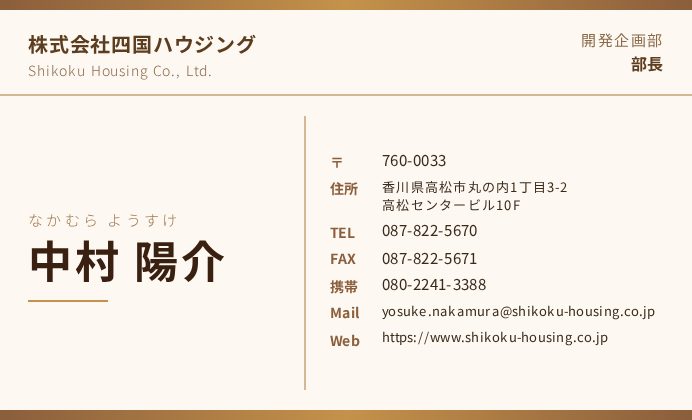
A real estate industry business card. All 5 models produced identical output.
{
"person_name": "中村 陽介",
"person_name_reading": "なかむら ようすけ",
"company_name": "株式会社四国ハウジング",
"company_name_en": "Shikoku Housing Co., Ltd.",
"department": "開発企画部",
"title": "部長",
"postal_code": "760-0033",
"address": "香川県高松市丸の内1丁目3-2 高松センタービル10F",
"phone": "087-822-5670",
"fax": "087-822-5671",
"mobile": "080-2241-3388",
"email": "[email protected]",
"website": "https://www.shikoku-housing.co.jp"
}
All 13 fields match exactly. Business cards have a fixed layout and few fields, so for the top models this is essentially impossible to get wrong. Claude Opus and both Gemini models hit 1.0 across all 10 business cards.
References
- ocr-comparison (GitHub)
- Previous article
- Agent Skills
- Structured outputs