What skill-creator Teaches Us About Skill Design, and How to Build Orchestration Skills
by 逆瀬川ちゃん
16 min read
Introduction
Hi there! This is Sakasegawa-chan (@gyakuse)!
Today I want to take a deep dive into skill-creator, a skill officially released by Anthropic.
skill-creator is "a skill for making skills," and the structure of the skill itself is actually a treasure trove of best practices for skill design. On top of that, I'll compare it with agentic-bench (introduction article), a skill I previously built for automatic ML model benchmarking, and think about how to design "skills that orchestrate multiple processes."
What are Agent Skills in the first place?
First, let me briefly cover Agent Skills as a prerequisite.
Agent Skills are instruction sets that teach Coding Agents how to handle specific tasks or workflows, packaged as a simple folder. Once you teach it, you don't have to explain it again each time. Anthropic introduced it for Claude in October 2025, and in December of the same year it was released as an open standard. As of March 2026, over 30 platforms including OpenAI Codex, Gemini CLI, and GitHub Copilot have adopted it.
The folder structure looks like this.
your-skill-name/
├── SKILL.md # Required - main instruction file
├── scripts/ # Optional - executable code (Python, Bash, etc.)
├── references/ # Optional - documents loaded as needed
└── assets/ # Optional - templates, fonts, icons, etc.
SKILL.md contains YAML frontmatter (name and description) and a Markdown body. The description is used to decide when the skill triggers, and the body contains detailed instructions for after the skill is invoked.
The core of the design is Progressive Disclosure. It's a three-layer lazy loading scheme that loads only the information needed, when needed.
| Layer | Content | Load timing |
|---|---|---|
| Level 1 | name + description (~100 tokens) | Always injected into system prompt |
| Level 2 | SKILL.md body (<5,000 tokens recommended) | When the skill is triggered |
| Level 3 | scripts/, references/, assets/ | Only when referenced |
The Anthropic Engineering Blog describes this design as "the context window is a commons." Your skill shares the same space as other skills and the system prompt, so loading things progressively becomes critical.
Let me also position it relative to MCP. Where MCP provides the "hands and feet" of a Coding Agent (tools and connectivity), Skills provide "in-brain knowledge" (workflows and best practices). Borrowing the kitchen metaphor from the official guide, MCP is the "professional kitchen" (tools, ingredients, equipment), and Skills are the "recipes" (procedure manuals).
Unrelated to the main thread, but I previously wrote about an idea called MCP Light. MCP is a great kitchen, but it tends to crowd the context window and eat up the instruction budget. MCP Light is an idea for introducing Progressive Disclosure to MCP by combining it with Skills.
What is skill-creator
What it does for you
skill-creator is a meta-skill that guides you through creating, improving, and measuring the performance of Agent Skills. When a user says "I want to build a skill that does X," it walks you through the following flow.
- Intent capture — interviews you on what the skill does, when it should trigger, and what the output format should be
- SKILL.md drafting — writes the skill based on the interview results
- Test case creation — creates 2-3 realistic prompts and saves them to evals.json
- Parallel evaluation — runs the with_skill version and the baseline version concurrently using sub-agents
- Grading and aggregation — evaluates each assertion with grader.md, then aggregates stats with aggregate_benchmark.py
- Browser review — generates an HTML viewer so humans can give feedback
- Improvement loop — incorporates feedback and re-tests, iterating until convergence
- Description optimization — auto-improves the description to raise trigger accuracy
- Packaging — zips everything up as a .skill file
In other words, it's like a "CI/CD pipeline for skills." The draft → test → review → improve cycle is driven by the agent itself.
SKILL.md's design philosophy
skill-creator's SKILL.md is about 480 lines, and reading it reveals something interesting. It's not really a procedure manual — it's an orchestrator's script.
SKILL.md itself focuses purely on "overall flow control" and delegates concrete specialized processing to external components.
SKILL.md (~480 lines): flow control, user communication guidelines
├── agents/grader.md: expert at assertion evaluation
├── agents/comparator.md: A/B comparison of outputs (blinded evaluation of which skill produced each output)
├── agents/analyzer.md: expert at pattern analysis
├── references/schemas.md: data format contract
└── scripts/ (8 of them): deterministic processing (parallel execution, aggregation, packaging, etc.)
SKILL.md just says "at this point, read grader.md and spawn a sub-agent" or "run aggregate_benchmark.py for this aggregation" — it never steps into the internals of each component.
Best Practices for Skill Design, Learned from skill-creator's Structure
skill-creator isn't just "teaching you how to build skills" — its very structure is a showcase of design patterns. Let me extract some patterns you can reuse.
1. Make SKILL.md an orchestrator and delegate specialized work to SubAgents
The most interesting thing about skill-creator's structure is that SKILL.md itself barely does anything.
As noted, SKILL.md is about 480 lines of pure flow control, and actual specialized work is delegated to sub-agent prompts in the agents/ directory. grader.md (224 lines) handles assertion evaluation, comparator.md (203 lines) handles A/B comparison, and analyzer.md (275 lines) handles pattern analysis.
Putting all of that into SKILL.md would easily blow past 1000 lines. By separating them into sub-agents, only grader.md is loaded into context during the evaluation phase, and only comparator.md is loaded during the comparison phase. Progressive Disclosure (the three-layer loading mentioned earlier) is being applied even to the skill's internal design.
The official guide says "write procedures in SKILL.md and split the details into references/," but skill-creator goes one step further by splitting out the prompts that do the work themselves. SKILL.md functions as an orchestrator that only describes "when, who, and what to delegate." I'll compare this orchestration pattern with another approach later.
2. Push deterministic work into scripts
The official best practices put it as "Code is deterministic; language interpretation isn't." Work that Coding Agents are bad at should be offloaded to scripts.
Looking at skill-creator's scripts, the offload boundary becomes clear.
| Script | What it does | Why Coding Agents are bad at it |
|---|---|---|
| run_eval.py | Runs claude -p in parallel and monitors stream events | Loops and parallelism |
| aggregate_benchmark.py | 3-stage aggregation: per-run → per-eval → per-config | Exact numerical computation |
| improve_description.py | Improves descriptions via Extended Thinking (budget_tokens=10000) | Self-referential API calls |
| package_skill.py | ZIP packaging | File operations |
The key is drawing the line of "what to delegate to the Coding Agent." Give judgment, analysis, and prose generation to the agent; give loops, aggregation, and file operations to scripts. Getting this division right dramatically raises the skill's overall reliability.
3. Schema contracts — tighten the handoff between Coding Agent and scripts
skill-creator's references/schemas.md defines 7 JSON schemas: evals.json, grading.json, benchmark.json, comparison.json, timing.json, history.json, and metrics.json.
Why this matters: Coding Agent output varies in format. skill-creator's references/schemas.md explicitly warns that renaming configuration to config, or pulling pass_rate out of its nesting, will cause the viewer to display empty values.
SKILL.md: "follow the grading.json format in references/schemas.md"
↓
Coding Agent: emits JSON per the schema
↓
scripts/aggregate_benchmark.py: parses assuming the schema
↓
eval-viewer/: generates HTML assuming the schema
If you're building a skill where a Coding Agent collaborates with scripts, this "schema contract" pattern is essential. Writing down exactly what scripts expect in references/ stabilizes the output format of the Coding Agent.
4. Why-driven Prompt Design — explain the reason
skill-creator's SKILL.md has a very striking passage.
If you find yourself writing ALWAYS or NEVER in all caps, or using super rigid structures, that's a yellow flag — if possible, reframe and explain the reasoning so that the model understands why the thing you're asking for is important.
Putting ALWAYS or NEVER in all caps is a yellow flag — explain "why it matters" instead.
The official best practices say the same thing: "Ask yourself: Would Claude do this anyway if it were smart enough?"
| Must-driven (old style) | Why-driven (recommended) |
|---|---|
| "ALWAYS validate before submission" | "Validation prevents API errors that waste tokens and frustrate users" |
| "NEVER skip the formatting step" | "Consistent formatting ensures the viewer can parse results correctly" |
If the reason is understood, the model can also handle unknown cases. You don't have to rely on exhaustively enumerated rules.
That said, truly critical spots still need hard constraints. skill-creator itself issues strict instructions about matching viewer field names exactly. Use Must-driven for "a narrow bridge with cliffs on both sides" and Why-driven for "an open field with no obstacles."
5. description is the lifeline of triggering
What skill-creator pours the most effort into is actually the description field. It has three scripts (run_loop.py, improve_description.py, run_eval.py) dedicated solely to Description Optimization.
Why? Because whether Claude uses a skill at all is decided by the description. Only name + description is permanently injected into the system prompt — the SKILL.md body is only loaded after the skill triggers. So if the description is poor, the skill is never called.
skill-creator's approach is statistical.
- Create 20 test queries (mix of should_trigger and should_not_trigger)
- Split 60/40 into train/test
- Run each query 3 times for statistical reliability
- Improve the description using Extended Thinking (budget_tokens=10000)
- Up to 5 iterations
- Pick the best based on test score (to prevent overfitting)
The train/test split and blinded_history (hiding test results from the improvement model) are built in specifically to prevent overfitting.
SKILL.md also says this about how to write a description.
currently Claude has a tendency to "undertrigger" skills -- to not use them when they'd be useful. To combat this, please make the skill descriptions a little bit "pushy".
Translation: Claude tends to under-use skills, so make descriptions a little "pushy." Concretely, the recommended style is not just "How to build a simple fast dashboard" but also enumerating trigger contexts like "Make sure to use this skill whenever the user mentions dashboards, data visualization, internal metrics..."
6. Take Human-in-the-Loop outside of chat
skill-creator generates a local HTML dashboard via eval-viewer/generate_review.py and collects feedback in the browser. A text-based chat UI has limits when you need to compare large numbers of test results or juxtapose outputs across multiple versions.
Opinions are collected in a structured feedback.json format, which the Coding Agent reads and folds into the next iteration. There's even a 5-second auto-refresh so you can watch the optimization loop's progress in real time.
I think "when you need human feedback, don't stay inside the chat UI — generate an interface that fits the task" will become a standard pattern in future skill design.
7. Per-environment fallbacks for portability
This isn't a practice every skill needs, but it's worth referencing if portability is on your mind.
One of Agent Skills' design principles is portability: "Skills work identically across Claude.ai, Claude Code, and API." skill-creator takes this seriously and has dedicated sections in SKILL.md for Claude.ai and Cowork.
Specifically, it spells out which features aren't available per environment and provides alternatives.
| Feature | Claude Code | Claude.ai | Cowork |
|---|---|---|---|
| Parallel sub-agent execution | Yes | No → run one at a time sequentially | Yes |
| Browser viewer | Yes | No → review inline within the conversation | No → generate standalone HTML with --static |
| Baseline comparison | Yes | No → skip | Yes |
| Description optimization | Yes (uses claude -p) |
No → skip | Yes |
Claude.ai can't spawn sub-agents, so the fallback is "read the skill yourself, run it yourself, and test one at a time." Cowork can't open a browser, so use --static to produce a standalone HTML. And so on.
The key is that even under environment constraints, "the core workflow (draft → test → review → improve) doesn't change." Only the execution method per step changes; the skill's essential value is environment-independent. If you're building a skill meant to run across multiple environments, this pattern is a useful reference.
On Orchestration Skills
Now we get to the main topic. skill-creator and agentic-bench are both orchestration-style skills that "control multiple processes together," but their architectures are fundamentally different.
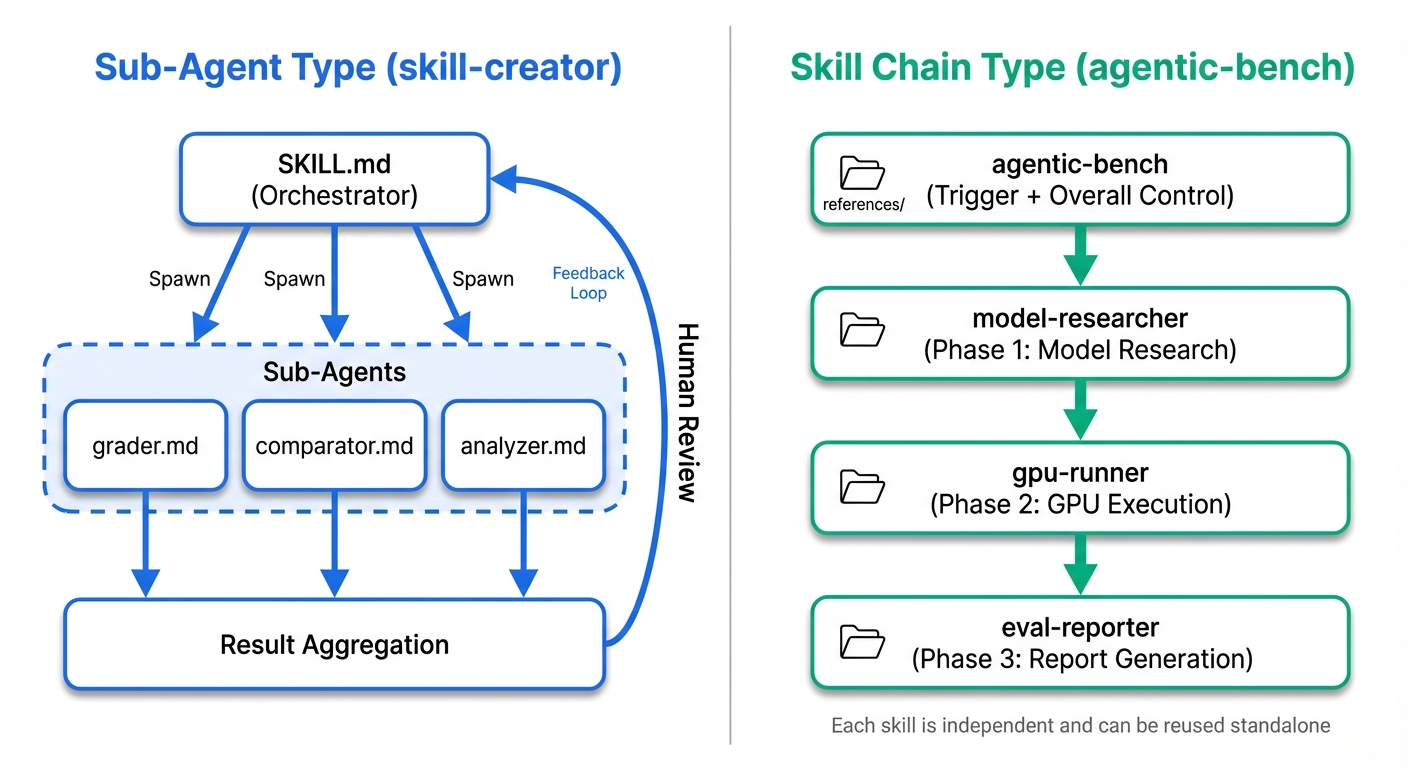
skill-creator's orchestration — Sub-agent type
skill-creator is a model where a single parent skill spawns multiple sub-agents and runs them in parallel.
SKILL.md (orchestrator)
├── Spawn → run with_skill version
├── Spawn → run baseline version (parallel, same turn)
↓ (wait for completion)
├── Spawn → agents/grader.md (evaluation)
├── Spawn → agents/comparator.md (blinded comparison)
└── agents/analyzer.md (analysis)
↓
aggregate → viewer generation → wait for feedback → improve → loop again
The characteristics are:
- SKILL.md is a manager: it doesn't do specialized processing itself; it delegates to sub-agents
- High parallelism: with_skill and baseline versions are spawned in the same turn to save time
- Shared global context: sub-agents inherit the parent's context, so they understand the task as a whole
- Human collaboration is assumed: the feedback loop is core to the workflow
The key is separating sub-agent prompts into the agents/ directory. grader.md (224 lines), comparator.md (203 lines), and analyzer.md (275 lines) each carry detailed instructions as domain experts. Putting everything into SKILL.md would exceed 1000 lines, but by loading only the agent instructions needed at the moment, context efficiency is preserved.
agentic-bench's orchestration — Skill Chain type
For agentic-bench (introduction article), which I previously built for automatic ML model benchmarking and reporting, I took a completely different approach. Just running agentic-bench does everything automatically — model research, GPU execution, report generation — but internally it's a pipeline of independent skills chained together.
agentic-bench (trigger + overall control)
↓
model-researcher (Phase 1: model research, VRAM estimation, provider selection)
↓
gpu-runner (Phase 2: inference code generation, cloud execution, result collection)
↓
eval-reporter (Phase 3: metrics.json + HTML report generation)
These are 4 independent skills. Each has its own SKILL.md, scripts/, and references/, and each can be used standalone. You can call just model-researcher to investigate a model, or call just gpu-runner to run code on a GPU.
There were three reasons I went with this design.
1. Sequential order of operations
ML benchmarking workflows have an inherent ordering. You can't run on GPU before researching the model, and you can't write a report without execution results. This "research → execute → report" sequential flow maps directly onto skill boundaries.
2. Use references/ as a "cheat sheet"
agentic-bench's references/ serve a fundamentally different purpose than skill-creator's. skill-creator's references/schemas.md is a "data format contract," but agentic-bench's references/eval-llm.md and references/modal.md are "senior engineer expertise."
eval-llm.md says "when evaluating LLMs, use this input pattern, define smoke tests this way, run quality checks this way." modal.md says "when deploying to Modal, write code like this, and when you see this error, handle it this way."
When a new model type shows up, you just add eval-new-type.md. When a new provider appears, you just add new-provider.md. You extend knowledge without touching the skill code.
3. Scripts as optional tools
skill-creator's scripts are required components. Without aggregate_benchmark.py you can't aggregate statistics.
For agentic-bench, by contrast, I designed scripts to be "nice to have but not essential."
run hf_model_info.py
├── success → use the JSON result
└── failure → the Coding Agent investigates model info itself via web search
Even if gpu_estimator.py fails, the Coding Agent can roughly estimate VRAM from the model's parameter count and the GPU's specs. The decision criterion is "can a Coding Agent do this from scratch?" Information gathering is something a Coding Agent can handle, so it becomes optional; statistical computation is something it struggles with, so it becomes required.
Comparing the two orchestration strategies
| Design axis | Sub-agent type (skill-creator) | Skill Chain type (agentic-bench) |
|---|---|---|
| Execution model | Spawn sub-agents within one skill | Chain of independent skills in series |
| Context management | Sub-agents inherit parent context | Each skill holds only its own domain |
| Processing flow | Parallel (simultaneous spawn) | Sequential (ordered phase transitions) |
| Standalone use | Sub-agents can't be used alone | Each skill is independently usable |
| Human involvement | Mid-loop feedback is central | Fully autonomous except for a cost gate |
| Role of references/ | Meta-knowledge (schema definitions) | Domain-specific cheat sheets |
| Nature of scripts | Required components | Optional tools |
| How to extend | Add more agents/ or scripts/ | Add more references/ files |
Which Skill Orchestration should you build
I've written this as a contrast, but the two aren't mutually exclusive.
Sub-agent type is a pattern where one skill spawns sub-agents to delegate processing. The typical case is evaluating from multiple perspectives in parallel, as skill-creator does, but you can also spawn sequentially.
Skill Chain type is a pattern where independent skills are linked into a pipeline. Each skill has its own SKILL.md, scripts/, and references/, and is independently reusable.
That said, Sub-agent doesn't mean interactive and Skill Chain doesn't mean autonomous. You can insert Human-in-the-Loop between stages of a Skill Chain, and you can drive Sub-agent type fully automatically. The degree of human involvement is a design decision independent of architecture.
You can also easily combine the two. For example, a design where each phase of a Skill Chain spawns Sub-agents in parallel. The reason I chose Skill Chain type for agentic-bench is that ML benchmarking has a clear order of operations. The "research → execute → report" sequential flow assigns completely different responsibilities to each phase. This ordering and the independence of each phase naturally led to a Skill Chain design.
Ultimately this reduces to an Agent Orchestration problem
So far I've been writing as if this were a Skill-specific topic, but these patterns are really design patterns for Agent Orchestration itself.
In Building Effective Agents, published by Anthropic in December 2024, agent compositions are organized into 5 workflow patterns plus autonomous agents.
| Pattern | Overview | Skill analogue |
|---|---|---|
| Prompt Chaining | Sequential execution of fixed steps, with optional gates between | Skill Chain type (agentic-bench) |
| Routing | Classify input and dispatch to a specialized process | Skill selection by description is itself Routing |
| Parallelization | Run multiple LLMs concurrently and aggregate | Parallel Spawn in Sub-agent type (skill-creator) |
| Orchestrator-Workers | A central LLM dynamically decomposes tasks and delegates | Delegation from SKILL.md to sub-agents |
| Evaluator-Optimizer | Iterative generation-and-evaluation loop | skill-creator's improvement loop (grader → improve → re-test) |
skill-creator's Sub-agent type is a combination of Parallelization and Orchestrator-Workers. Running with_skill and baseline concurrently is Parallelization, delegating to grader/comparator/analyzer is Orchestrator-Workers, and the overall improvement loop is Evaluator-Optimizer. Multiple patterns coexist within a single skill.
agentic-bench's Skill Chain type corresponds to Prompt Chaining, but its distinctive feature is that each node is an independent skill. Because each skill carries its own SKILL.md, scripts/, and references/, you can swap pipeline nodes or reuse them standalone.
Just as Google ADK expresses its 8 multi-agent patterns as primitives like SequentialAgent, ParallelAgent, and LoopAgent, convergence on orchestration patterns is happening across the industry. The names and APIs differ, but the underlying structures are the same.
In other words, Skill Orchestration design decisions can be considered with the same framework as Agent Orchestration decisions. "Parallel or serial?" "Dynamic decomposition or fixed pipeline?" "Iterative or one-shot?" "Where to insert humans?" — combine these axes and pick the composition that best fits the task. The Skill file structure (SKILL.md, agents/, scripts/, references/) is merely a container for implementing these patterns.
Where Skill Development is Headed
From "a bundle of prompts" to "small software"
Looking back at skill-creator's structure, this is no longer "a bundle of prompts."
- SKILL.md: orchestrator (control flow)
- agents/: expert prompts (domain logic)
- references/: data contracts or domain knowledge (config / knowledge base)
- scripts/: deterministic processing (execution engine)
- eval-viewer/: user interface
It's a "small software architecture" with MVC-like separation of concerns. As skill complexity grows, this kind of structuring becomes unavoidable.
Design guidelines for Orchestration Skills
Based on the analysis so far, here are guidelines for building orchestration-style skills.
1. Keep SKILL.md focused on flow control
Don't write the details of specialized processing into SKILL.md. Separate them into agents/ or references/ and leave only pointers for "when to load what." skill-creator gets away with 480 lines because over 700 lines of sub-agent prompts live externally.
2. Pick architecture by parallelism vs. ordering
- Processing the same data from multiple perspectives in parallel → Sub-agent type
- Clear ordering with different responsibilities per phase → Skill Chain type
3. Design schema contracts first
If a Coding Agent collaborates with scripts, start by writing references/schemas.md. Define the JSON format scripts expect strictly, and have SKILL.md say "follow this schema." The skill-creator example that explicitly says "use configuration, not config, or the viewer will break" vividly illustrates why this matters.
4. Consciously decide which scripts are required vs. optional
The criterion is "can a Coding Agent do this from scratch?"
- Statistical computation, parallel processing, file operations → required scripts
- Information gathering, format conversion → optional (Coding Agent fallback OK)
5. Pour effort into the description
skill-creator's choice to dedicate three scripts solely to description optimization is correct. If the skill doesn't trigger, it might as well not exist. Write in the [What] + [When] + [Key capabilities] structure, and be a little pushy.
6. Write Why-driven, and use Must-driven only near the cliff
The default is to explain "why it's needed." Only for truly critical constraints — schema field-name matching, security-related points — make them explicit MUSTs.
skill-creator's open problem — controlling attention competition across skills
Having looked at skill-creator's design, there's still room for improvement in how it handles attention competition.
skill-creator's Description Optimization evaluates by temporarily creating a command file for the target skill with claude -p. At this time, other skills installed in the executor's environment are also loaded, so testing does happen under some level of competition. improve_description.py has the hint "The description competes with other skills for Claude's attention — make it distinctive and immediately recognizable," and SKILL.md's test query design also says to include "cases where this skill competes with another but should win." Competition is recognized and implicitly tested.
However, this competitive environment is not controlled. Which skills sit alongside yours depends on who runs it, and the eval set has no relative judgment of the form "for this query, skill B should trigger instead of skill A." It's very possible that optimizing skill A's description to be "pushier" reduces the trigger rate of a neighboring skill B — but there's no mechanism to detect this.
This is a problem that goes beyond individual skill optimization — it's about optimizing the skill portfolio as a whole.
- Zero-sum attention competition: strengthening skill A's description may lower the trigger rate of a similar-domain skill B
- Uncontrolled competitive environment: which skills coexist during testing depends on the executor, hurting reproducibility
- Description-length dilemma: longer descriptions raise trigger accuracy, but if every skill writes long descriptions the whole system prompt swells
In the future, a mechanism for Description Optimization with explicitly specified competing skills, or something that optimizes trigger accuracy across an entire skill set, would make this much more practical.
Summary
skill-creator isn't simply "a tool that creates skills for you." Its structure itself is an implementation example of best practices: Progressive Disclosure, offloading deterministic work, schema contracts, Why-driven design, UI generation for Human-in-the-Loop.
Orchestration-style skills come in two architectures — Sub-agent type (skill-creator) and Skill Chain type (agentic-bench) — and you pick between them based on the parallelism and ordering of the work.
As skill complexity continues to grow, "write everything in SKILL.md" designs will hit their limits, and software-architecture-style structuring will become the norm. skill-creator is already implementing that future today.
References
Official docs
- The Complete Guide to Building Skills for Claude
- Equipping Agents for the Real World with Agent Skills
- Best Practices
Related repositories
- anthropics/skills/skill-creator — Anthropic's official meta-skill
- nyosegawa/agentic-bench — an agent-driven ML model validation framework (introduction article)